[phpBB Debug] PHP Warning: in file [ROOT]/viewtopic.php on line 2075: compact(): Undefined variable $warn_allowed [phpBB Debug] PHP Warning: in file [ROOT]/viewtopic.php on line 2182: Undefined variable $warn_allowed [phpBB Debug] PHP Warning: in file [ROOT]/viewtopic.php on line 2075: compact(): Undefined variable $warn_allowed [phpBB Debug] PHP Warning: in file [ROOT]/viewtopic.php on line 2182: Undefined variable $warn_allowed [phpBB Debug] PHP Warning: in file [ROOT]/viewtopic.php on line 2075: compact(): Undefined variable $warn_allowed [phpBB Debug] PHP Warning: in file [ROOT]/viewtopic.php on line 2182: Undefined variable $warn_allowed [phpBB Debug] PHP Warning: in file [ROOT]/viewtopic.php on line 2075: compact(): Undefined variable $warn_allowed [phpBB Debug] PHP Warning: in file [ROOT]/viewtopic.php on line 2182: Undefined variable $warn_allowed [phpBB Debug] PHP Warning: in file [ROOT]/viewtopic.php on line 2075: compact(): Undefined variable $warn_allowed [phpBB Debug] PHP Warning: in file [ROOT]/viewtopic.php on line 2182: Undefined variable $warn_allowed [phpBB Debug] PHP Warning: in file [ROOT]/viewtopic.php on line 2075: compact(): Undefined variable $warn_allowed [phpBB Debug] PHP Warning: in file [ROOT]/viewtopic.php on line 2182: Undefined variable $warn_allowed [phpBB Debug] PHP Warning: in file [ROOT]/viewtopic.php on line 2075: compact(): Undefined variable $warn_allowed [phpBB Debug] PHP Warning: in file [ROOT]/viewtopic.php on line 2182: Undefined variable $warn_allowed [phpBB Debug] PHP Warning: in file [ROOT]/viewtopic.php on line 2075: compact(): Undefined variable $warn_allowed [phpBB Debug] PHP Warning: in file [ROOT]/viewtopic.php on line 2182: Undefined variable $warn_allowed [phpBB Debug] PHP Warning: in file [ROOT]/viewtopic.php on line 2075: compact(): Undefined variable $warn_allowed [phpBB Debug] PHP Warning: in file [ROOT]/viewtopic.php on line 2182: Undefined variable $warn_allowed [phpBB Debug] PHP Warning: in file [ROOT]/viewtopic.php on line 2075: compact(): Undefined variable $warn_allowed [phpBB Debug] PHP Warning: in file [ROOT]/viewtopic.php on line 2182: Undefined variable $warn_allowed [phpBB Debug] PHP Warning: in file [ROOT]/viewtopic.php on line 2075: compact(): Undefined variable $warn_allowed [phpBB Debug] PHP Warning: in file [ROOT]/viewtopic.php on line 2182: Undefined variable $warn_allowed [phpBB Debug] PHP Warning: in file [ROOT]/viewtopic.php on line 2075: compact(): Undefined variable $warn_allowed [phpBB Debug] PHP Warning: in file [ROOT]/viewtopic.php on line 2182: Undefined variable $warn_allowed [phpBB Debug] PHP Warning: in file [ROOT]/viewtopic.php on line 2075: compact(): Undefined variable $warn_allowed [phpBB Debug] PHP Warning: in file [ROOT]/viewtopic.php on line 2182: Undefined variable $warn_allowed [phpBB Debug] PHP Warning: in file [ROOT]/viewtopic.php on line 2075: compact(): Undefined variable $warn_allowed [phpBB Debug] PHP Warning: in file [ROOT]/viewtopic.php on line 2182: Undefined variable $warn_allowed [phpBB Debug] PHP Warning: in file [ROOT]/viewtopic.php on line 2075: compact(): Undefined variable $warn_allowed [phpBB Debug] PHP Warning: in file [ROOT]/viewtopic.php on line 2182: Undefined variable $warn_allowed [phpBB Debug] PHP Warning: in file [ROOT]/viewtopic.php on line 2075: compact(): Undefined variable $warn_allowed [phpBB Debug] PHP Warning: in file [ROOT]/viewtopic.php on line 2182: Undefined variable $warn_allowed [phpBB Debug] PHP Warning: in file [ROOT]/viewtopic.php on line 2075: compact(): Undefined variable $warn_allowed [phpBB Debug] PHP Warning: in file [ROOT]/viewtopic.php on line 2182: Undefined variable $warn_allowed [phpBB Debug] PHP Warning: in file [ROOT]/viewtopic.php on line 2075: compact(): Undefined variable $warn_allowed [phpBB Debug] PHP Warning: in file [ROOT]/viewtopic.php on line 2182: Undefined variable $warn_allowed [phpBB Debug] PHP Warning: in file [ROOT]/viewtopic.php on line 2075: compact(): Undefined variable $warn_allowed [phpBB Debug] PHP Warning: in file [ROOT]/viewtopic.php on line 2182: Undefined variable $warn_allowed [phpBB Debug] PHP Warning: in file [ROOT]/viewtopic.php on line 2075: compact(): Undefined variable $warn_allowed [phpBB Debug] PHP Warning: in file [ROOT]/viewtopic.php on line 2182: Undefined variable $warn_allowed [phpBB Debug] PHP Warning: in file [ROOT]/includes/functions.php on line 4218: Cannot modify header information - headers already sent by (output started at [ROOT]/includes/functions.php:3103) [phpBB Debug] PHP Warning: in file [ROOT]/includes/functions.php on line 4218: Cannot modify header information - headers already sent by (output started at [ROOT]/includes/functions.php:3103) [phpBB Debug] PHP Warning: in file [ROOT]/includes/functions.php on line 4218: Cannot modify header information - headers already sent by (output started at [ROOT]/includes/functions.php:3103) [phpBB Debug] PHP Warning: in file [ROOT]/includes/functions.php on line 4218: Cannot modify header information - headers already sent by (output started at [ROOT]/includes/functions.php:3103) Bug Reports - Page 4 - Factorio Forums
Airat9000 wrote: Bug!!! More items in inventory.. fix thanks
Sorry...
Solutions:
1) redownload, if you downloaded mod version 1.1.7 before I posted this
2) delete line 18 & 19 of the control.lua file
3) replace line 18 & 19 with the following:
drs9999 wrote:
EDIT: fixed another bug, so you probably want to redownload it anyway
Hm in my opinion fixing a bug means that you increase the version number, so that everybody can see there was something fixed. You could use a sceme like A.B.C where A is the mayor release number (only increased in case of rewrite), B the minor version number (increased if features are added) and C the bugfix version.
Airat9000 wrote: Bug!!! More items in inventory.. fix thanks
Sorry...
Solutions:
1) redownload, if you downloaded mod version 1.1.7 before I posted this
2) delete line 18 & 19 of the control.lua file
3) replace line 18 & 19 with the following:
drs9999 wrote:
EDIT: fixed another bug, so you probably want to redownload it anyway
Hm in my opinion fixing a bug means that you increase the version number, so that everybody can see there was something fixed. You could use a sceme like A.B.C where A is the mayor release number (only increased in case of rewrite), B the minor version number (increased if features are added) and C the bugfix version.
I agree with the OP since I agree with this standard. Easy to understand, pratical and universal.
Understood.
It's a common scheme that I followed most of the time, but there were exceptions (like the last release, though)
Anyway I'll try to follow it more strictly in the future.
Which leads me to mods-version 1.1.8 which contains nothing new, but the changes I made earlier today
(removing debug-stuff and adding ability to use the mod in god-mode; I consider the last one as a bugfix, too)
Airat9000 wrote:
who is file fix?
please link in new version fix,it
You can find the fixed version (1.1.8) in the main-thread.
Hi,
I seem to have messed up my save somehow: the trees have stopped growing!
The rubber trees from Dytech still grow but normal trees just stay seedlings. I doesn't matter if I place them myself or into a tree farm. Some trees I've planted earlier are stuck in the first growing stage.
When I create a new game the trees there grow again.
Darlis wrote:Hi,
I seem to have messed up my save somehow: the trees have stopped growing!
The rubber trees from Dytech still grow but normal trees just stay seedlings. I doesn't matter if I place them myself or into a tree farm. Some trees I've planted earlier are stuck in the first growing stage.
When I create a new game the trees there grow again.
Any idea how to rescue my 100h+ save?
I came across this same issue during my testing with treefarm and it's related to adding the mod to an in-progress game.
It can be fixed by modifying the utils.lua inittables function to check each value for "if nil, init the variables" and calling inittables onload as well as oninit.
Also, there's currently a bug with the script interface and dytech that can be seen on the dytech bug reports page. That issue comes from the above issue plus the populateSeedNameToSeedType() function. The function needs to be called when a seed is added so that table is re-populated with the new seed type added.
If you want to get ahold of me I'm almost always on Discord.
the mod was added mid-game indeed, however everything worked fine back then (probably until I've updated Treefarm and/or DyTech). I've now added the function to the onload funtion and then renamed "charcoal2" to "charcoal" as the game complained about it ("charcoal2" doesn't seem to be defined anywhere).
Now the newly plant trees grow again
However, during the same game session, the trees suddenly stopped growing, including the rubber trees! Newly planted trees will grow zero or three stages but then stop.
Adding the mod to an already started game shouldn't be a problem. However it seems that something went wrong while updating the mod.
Could you provide a save-game? When did you noticed that the first time, after updating the mod? If yes, from what version?
To your second post:
If you didn't make any adjustments in the initTable-function and just added the function call in the onLoad then it can't work. This way the data (for fields, planted trees, etc) is reseted everytime after you save/load the game.
I've upgraded from 1.1.6 to 1.1.8 That seemed to when the problem started.
And I can in fact reproduce it: I've downgraded to 1.1.6 and newly planted trees kept growing, the treefarms worked like a charm again.
Then as soon as I upgrade to 1.1.8, the trees - even newly planted ones - stopped growing (I used the original .zip again). There seems to be either a problem with 1.1.8 or the migration from 1.1.6 to 1.1.8. Or my save is somehow corrupt.
Should I upload a save so can reproduce this?
Darlis wrote:I've upgraded from 1.1.6 to 1.1.8 That seemed to when the problem started.
And I can in fact reproduce it: I've downgraded to 1.1.6 and newly planted trees kept growing, the treefarms worked like a charm again.
Then as soon as I upgrade to 1.1.8, the trees - even newly planted ones - stopped growing (I used the original .zip again). There seems to be either a problem with 1.1.8 or the migration from 1.1.6 to 1.1.8. Or my save is somehow corrupt.
Should I upload a save so can reproduce this?
Uploading the save would probably help. It for sure can't hurt.
If you want to get ahold of me I'm almost always on Discord.
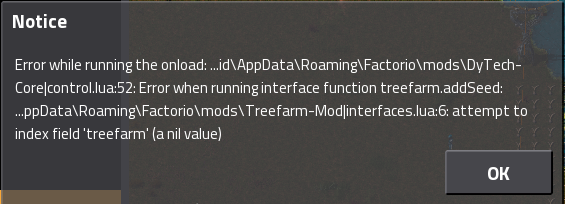
No good news so far. I did some testing on my own yesterday before you uploaded your savegame and everytime the migration between 1.1.6 and 1.1.8 worked fine. After trying your savegame I was able to reproduce it, however while trying I ran into some issues described here: https://forums.factorio.com/forum/vie ... f=7&t=5511
So could you try to disable all mods (except base and treefarm) and save & upload it please?
I've now managed to remove all the mods one by one (I also ran into the same errors you described). This save now has no mods except treefarm 1.1.6: https://www.dropbox.com/s/3vzqtr95300h7 ... 2.zip?dl=0
However, upgrading to 1.1.8, the trees still do not grow.
Using this save, I've remove treefarm, saved and installed 1.1.8 and trees are now growing like normal. That also means that all trees and facilities are gone too, and if that's the only solution to the problem I'd say that I stick with 1.1.6 for now and start a new game somewhere in the future.
Got it!
Actually it was quiet easy to fix, I just didn't considered some circumstances.
The bug appears in connection with the roadworks mod (or any other mod that add new tiles).
To calculate the growing time I used the underground to determine the "growing-speed" (trees in deserts should grow slower than trees on grassland,right?). If a tree is placed on a roadwork-tile it leads to a divison by zero in the calculation which is (by definition in lua) infinity. So the tree will reach its next growing stage in infinity, which will never happen and so it is blocking the whole system.
Long story short: I'll send you a dl-link for a fixed version, if you can confirm that the bug is fixed I'll release it to the public.
i don't know if it's because of dytech
but as soon as i try to make a big biomass setup it tells me "bad allocation" -> stuffs full my grafic memory and kills the game. (can't create sprite x not enough memory)
Might be because there are 2 ways to create liquid air and the game might have a issue with that.
i just added a 2nd biolab for liquid co2 when it happend again.
(it also crashed when i try to make a biolab circle since 1 biomass costs 0.1 and create 2x 0.1 i figured i could make a loop but that also kills the game.)