Digital Display, Yay!

This board is to show, discuss and archive useful combinator- and logic-creations.
Smart triggering, counters and sensors, useful circuitry, switching as an art :), computers.
Please provide if possible always a blueprint of your creation.
User avatar
DaveMcW
Smart Inserter
Smart Inserter
Posts: 3753
Joined: Tue May 13, 2014 11:06 am
Contact:

Re: Digital Display, Yay!

Post by DaveMcW »

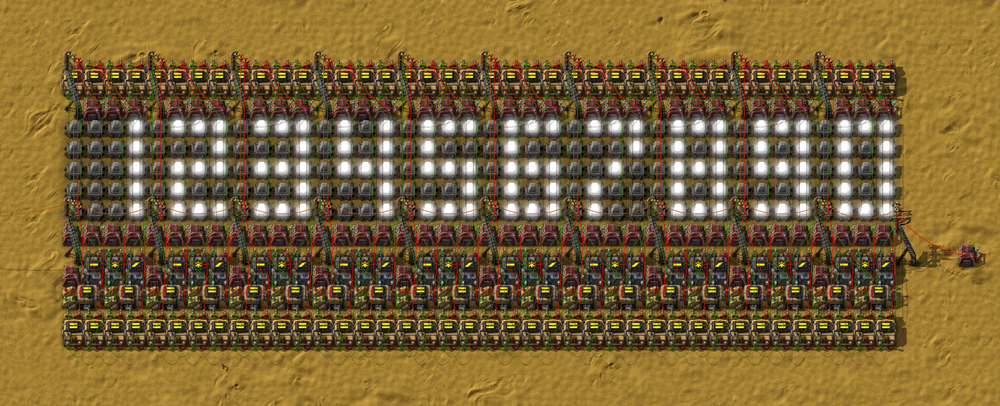
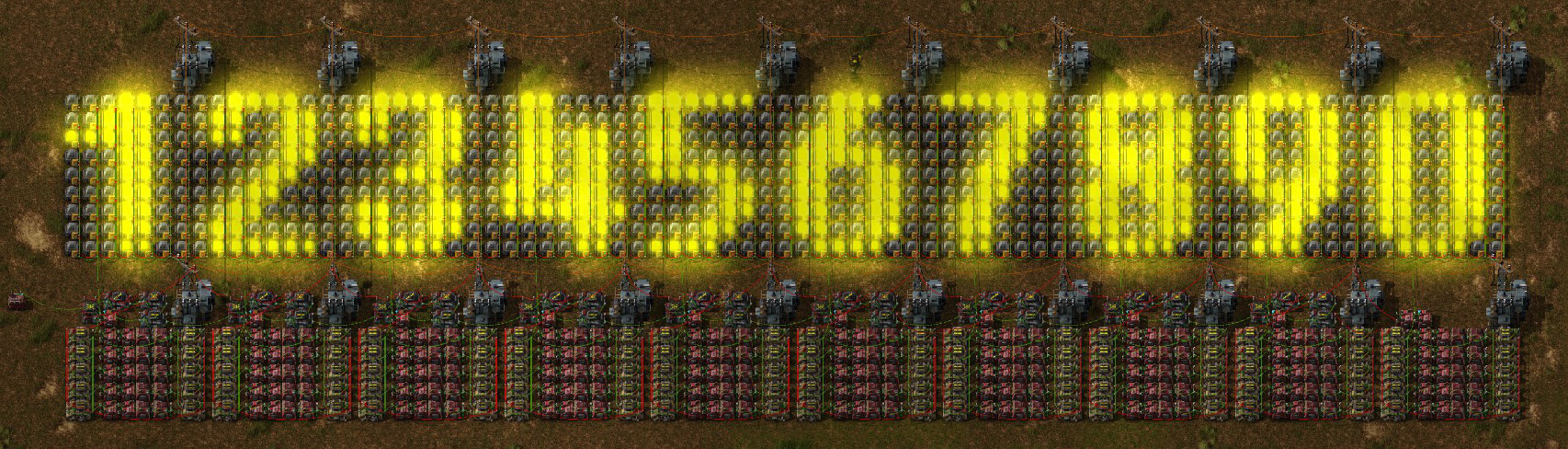
That 2-part divide all is really clever! And the 2-dimensional array lookup is great too. There is no way I can improve the logic, the best I can do is make it look pretty.

This blueprint does not require any wiring. The 3x3 loader can be removed when everything is working.
digit-display-7.jpg
digit-display-7.jpg (188.74 KiB) Viewed 22136 times
Blueprint
Last edited by DaveMcW on Sun May 08, 2016 4:58 am, edited 4 times in total.
XKnight
Filter Inserter
Filter Inserter
Posts: 329
Joined: Thu May 28, 2015 10:40 pm
Contact:

Re: Digital Display, Yay!

Post by XKnight »

I think we can write own "Digit display history":
Book
This was the cool history of the nice challenge.
153 combinators in the beginning vs 21 combinators in the end.
User avatar
DaveMcW
Smart Inserter
Smart Inserter
Posts: 3753
Joined: Tue May 13, 2014 11:06 am
Contact:

Re: Digital Display, Yay!

Post by DaveMcW »

I improved my loader a bit more, it now uses a checksum to avoid corrupt data.
alleckz
Manual Inserter
Manual Inserter
Posts: 1
Joined: Mon Apr 18, 2016 4:23 pm
Contact:

Re: Digital Display, Yay!

Post by alleckz »

DaveMcW wrote:"There is no way I can improve the logic, the best I can do is make it look pretty."
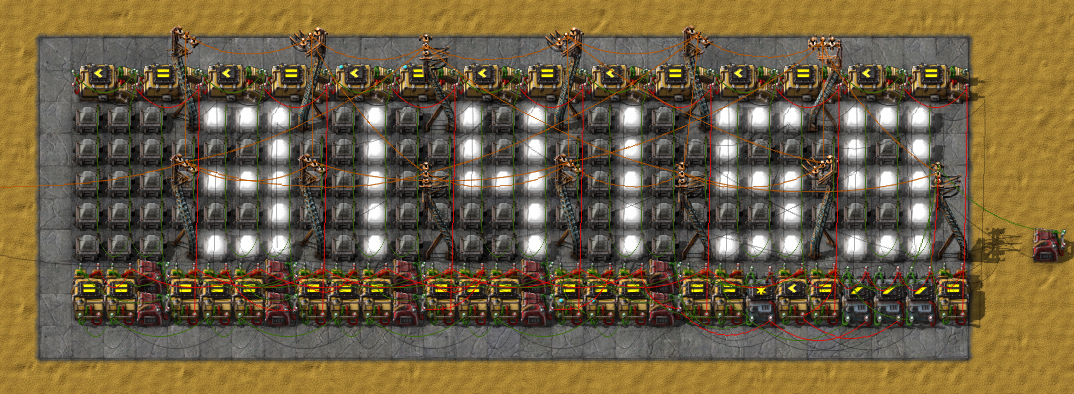
This is my version of makining it look pretty! By moving everything to the top and adding substation you can make the didgets clear from wires :)
factorio screen(5).jpg
factorio screen(5).jpg (90.23 KiB) Viewed 21464 times
blueprint
Read Me
User avatar
DaveMcW
Smart Inserter
Smart Inserter
Posts: 3753
Joined: Tue May 13, 2014 11:06 am
Contact:

Re: Digital Display, Yay!

Post by DaveMcW »

Putting the wires on top does look nicer, if you don't mind an extra tile of height.
digit-display-8.jpg
digit-display-8.jpg (191.9 KiB) Viewed 21451 times
Blueprint
Last edited by DaveMcW on Sun May 08, 2016 4:59 am, edited 1 time in total.
User avatar
DaveMcW
Smart Inserter
Smart Inserter
Posts: 3753
Joined: Tue May 13, 2014 11:06 am
Contact:

Re: Digital Display, Yay!

Post by DaveMcW »

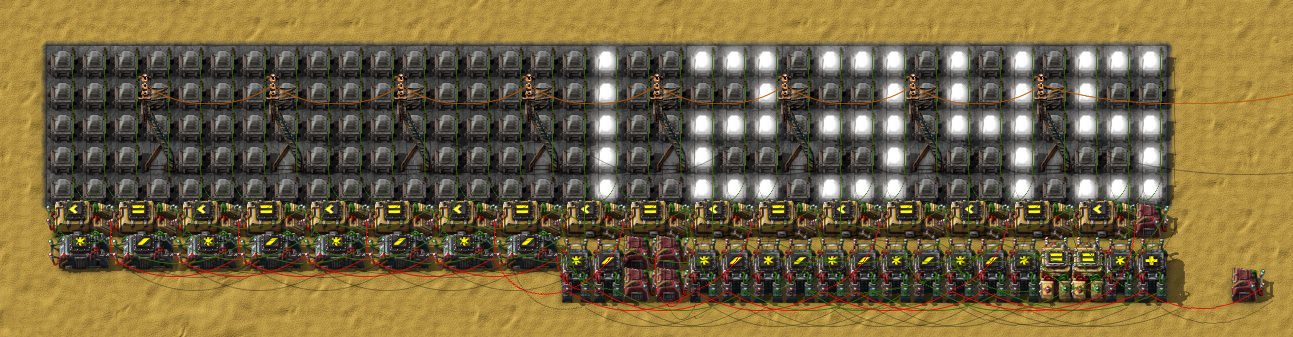
Just for fun, a hexadecimal display with 3 combinators and zero features.
hex.gif
hex.gif (201.05 KiB) Viewed 21381 times
Blueprint
daniel34
Global Moderator
Global Moderator
Posts: 2761
Joined: Thu Dec 25, 2014 7:30 am
Contact:

Re: Digital Display, Yay!

Post by daniel34 »

Merged both Digital Display topics in this subforum as they are about the same topic.
Some users already posted their creations in both threads anyway :lol:
quick links: log file | graphical issues | wiki
Aru
Fast Inserter
Fast Inserter
Posts: 212
Joined: Wed Apr 13, 2016 11:31 pm
Contact:

Re: Digital Display, Yay!

Post by Aru »

In case anyone is curious about how this works, I sort of reverse engineered DaveMcW's single-digit hexadecimal one from two posts earlier. These were my notes.
notes
I don't know what the purpose is for adding 100 to everything. It works just the same without it.
Amegatron
Long Handed Inserter
Posts: 62
Joined: Sun Mar 06, 2016 4:12 am
Contact:

Re: Digital Display, Yay!

Post by Amegatron »

I know I'm out of date with my version, but just wanted to share cause I'm happy I did it at last by myself :)
screenshot
blueprint
It detects signal change from the input and re-displays the number on the screen. Each screen section has it's memory cell to remember the cypher it should display.
Xelephant
Long Handed Inserter
Posts: 58
Joined: Sat Mar 26, 2016 6:58 pm
Contact:

Re: Digital Display, Yay!

Post by Xelephant »

alleckz wrote: This is my version of makining it look pretty! By moving everything to the top and adding substation you can make the didgets clear from wires :)
Sadly this doesn't work out of the box in 0.13. since the smart chest & curved Rail got removed.
Screenshot broken and fixed build with color
blueprint for .13
super_aardvark
Inserter
Inserter
Posts: 38
Joined: Thu Sep 15, 2016 6:27 am
Contact:

Re: Digital Display, Yay!

Post by super_aardvark »

Xelephant wrote: Sadly this doesn't work out of the box in 0.13. since the smart chest & curved Rail got removed.
Thanks for the updated version! I just found this thread today and was dismayed at the problems I had using the blueprints here. Only one problem with your version: when you remove the left-most decider to enable leading zeroes, it breaks that green circuit.

So, instructions for enabling leading zeroes: build it disconnected from power; remove the right-most Constant Combinator; remove the left-most Decider Combinator; add a green wire connection between the top ends of the two Arithmetic (+) Combinators to the right of the Decider you just removed (output of the first one to input of the second one).
realm174
Fast Inserter
Fast Inserter
Posts: 106
Joined: Sat Apr 02, 2016 12:32 pm
Contact:

Re: Digital Display, Yay!

Post by realm174 »

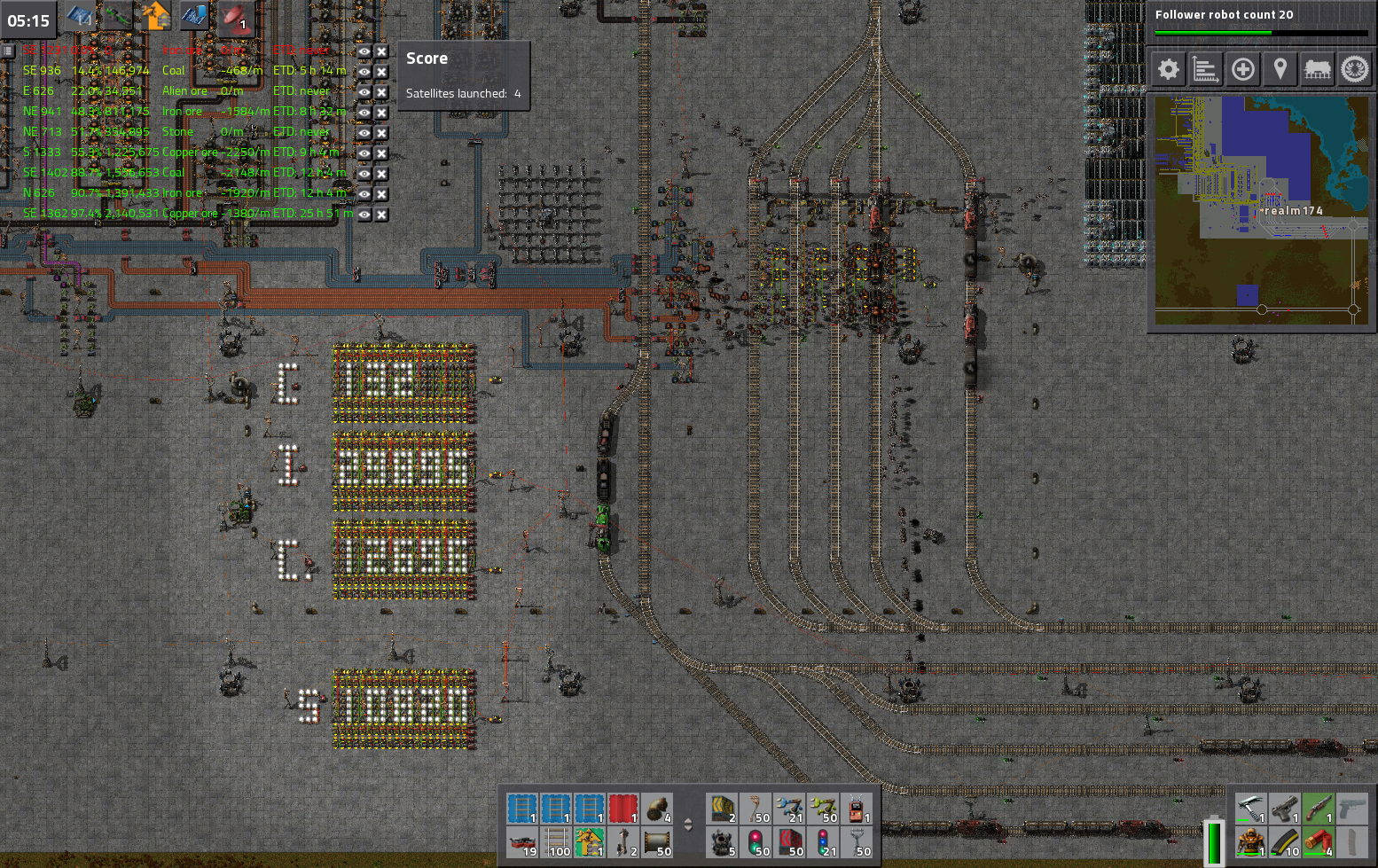
Yup, thanks for that, I am now able to see at a glance how many of which ores I have available in the system (see below). Note that there is actually 5 digits on the first display, but somehow only the first 3 got captured on the screenshot... That's kinda odd, but they do display properly ingame. So this is my unloading station, and it tells me how many items I have in the requester chests that get loaded by the unloading robots.

Image
c0bRa
Long Handed Inserter
Posts: 74
Joined: Sun Nov 13, 2016 8:33 pm
Contact:

Re: Digital Display, Yay!

Post by c0bRa »

Now here's mine display:
Image
It's the Fixedsys font (all but the "0", I let the "/" out for saving one combination, else the 0 would take 32 different lamps), and i've orientated me on the existing 8-block digits, this one has 45 different combinations of lamps.

I don't know how to post the blueprint string, can someone explain me, how i can post it?

Neverthemind i try to explain it:
In the normal digit blueprint you have 1 combinator for each number, for my version you need 2 combinators for each number, so just stretch the combinators to the left and right and connect both combinators.

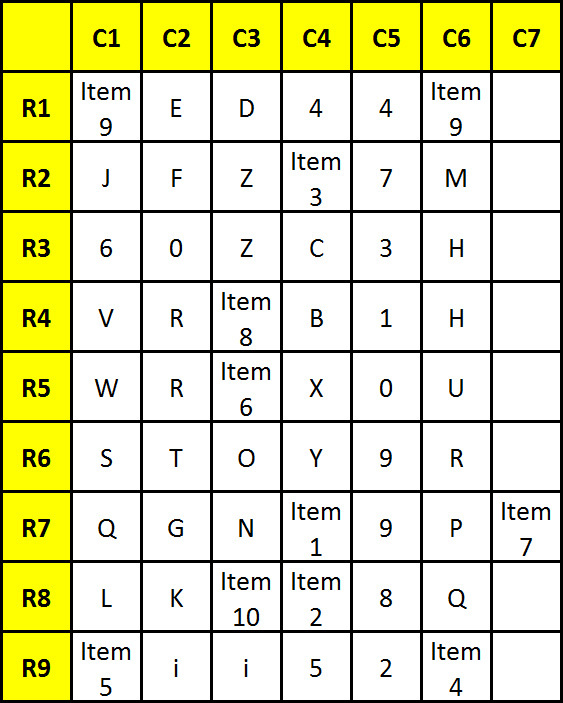
then fill the combinators for each number with the following output signals:

For Items you could chose what you want (except colors), i just ran out of numbers and characters

0: 0, 1, 2, 3, 4, 5, 6, 7, 8, 9, D, E, F, G, H, I, J, K, L, M, P, Q, R, S, T, U, V, W (for getting the "/" in, add also B, C, N and O, but then you need 3 constant combinators for the 0)
1: 0, 1, 2, 3, 4, 5, 6, 7, 8, 9, B, C, X, Y, Z, Item1, Item2, Item3
2: 0, 1, 2, 3, 4, 5, 6, 7, D, E, F, G, H, I, J, K, L, M, N, O, X, Y, Item4, Item5
3: 0, 1, 2, 3, 4, 5, 6, 7, 8, 9, D, E, F, G, H, I, J, K, L, M, P, Q, X, Item6
4: 0, 1, 2, 3, 8, 9, D, E, F, G, H, N, P, Q, R, S, T, U, Z, Item1, Item4, Item6, Item7, Item10
5: 0, 4, 5, 6, 8, 9, D, E, F, I, J, P, R, V, W, X, Item2, Item5, Item6, Item8
6: 0, 1, 2, 4, 5, 8, 9, B, D, G, I, K, L, P, Q, R, S, T, U, V, W, Z, Item3, Item7
7: 1, 3, 4, 7, B, C, D, E, G, I, K, M, N, O, X, Y, Item6, Item8, Item9
8: 0, 1, 2, 3, 4, 5, 6, 7, 8, 9, D, E, F, G, H, I, J, K, L, M, P, Q, R, S, T, V, X, Y, Item6, Item7
9: 0, 1, 3, 4, 5, 6, 7, 9, D, E, F, H, I, J, M, O, R, T, U, V, W, Y, Item1, Item2, Item9

the lamps have the following ">0" conditions:
Image
JosephBones
Burner Inserter
Burner Inserter
Posts: 12
Joined: Mon Jul 20, 2015 2:58 am
Contact:

Re: Digital Display, Yay!

Post by JosephBones »

Okay, i really like what you have done with the counter.. but where the hell i plug what i need tou count..... I have the one that have inserter as... counter.... and i want to count my liquid ( exammple Lubricant )... where i plug that container ?
parth718
Manual Inserter
Manual Inserter
Posts: 3
Joined: Wed Nov 23, 2016 2:16 pm
Contact:

Re: Digital Display, Yay!

Post by parth718 »

I have something to show too.

BEHOLD the 10x10 matrix display, it is accesible through simple (x,y) points.
[img]
20161130191334_1.jpg
[/img]

Working:-
As you can see in image i have assigned coordinates 1-10 to each row and each column.
To illuminate point on row 5 column 10 the (x,y) will be(10,5).....x and y coordinates are represented by number of a specific signal..
for eg, in earlier case , in x constant combinator [any signal]*(10), and in y constant combinator [signal used in x]*(5),
Note:- >each point is represented by different signals.
>you can add more constant combinators for more points
>I cant find where the blueprint string is saved so , I am sorry.
>you can expand it as much as you want I made 10*10 for prototype, the limiting factor is the number of different signals available.
A factorio enthusiast
Kazaide
Manual Inserter
Manual Inserter
Posts: 3
Joined: Fri Nov 18, 2016 1:03 pm
Contact:

Re: Digital Display, Yay!

Post by Kazaide »

The work that have been made here by DaveMcW and XKnight is just super impressive... really.
vzybilly
Fast Inserter
Fast Inserter
Posts: 143
Joined: Thu May 14, 2015 6:10 pm
Contact:

Re: Digital Display, Yay!

Post by vzybilly »

DaveMcW wrote:Putting the wires on top does look nicer, if you don't mind an extra tile of height.
digit-display-8.jpg
Blueprint
So, I tried building that amazing looking one, it took me from 36 FPS to 4... just thought I'd share a small giggle about my "potato computer". Can't wait for a better computer to use this...
Will code for Food. I also have 11+ mods!
Jythier
Inserter
Inserter
Posts: 37
Joined: Tue Nov 04, 2014 2:42 pm
Contact:

Re: Digital Display, Yay!

Post by Jythier »

So can someone explain how to use constant and decider combinators to create an alphabet?

Edit for specificity:

I understand that you have 1 constant combi for 0-9 and that it holds the signals you need to send to turn on each light. What I don't understand is how to use it as a lookup library for multiple digits. For example, if I want to display the number 123, I can separate the digits using the modulo method shown earlier. So I can get the digits. Now I need to send those to the library to figure out what signals it needs in order to light the correct lights, and now I have no clue how to deal with it.
Yamanqui
Manual Inserter
Manual Inserter
Posts: 1
Joined: Sat Mar 18, 2017 3:57 am
Contact:

Re: Digital Display, Yay!

Post by Yamanqui »

Jythier wrote:So can someone explain how to use constant and decider combinators to create an alphabet?
That was something that really amazed me from XKnight's design, and it took me a while to fully understand how it worked. Finally I wrote a simple script to generate the signal alphabet and lamp configuration to embed an arbitrary character set.

What you want to see on the lamps can be represented logically as a list true and false values, for example if you wanted to represent the number 4 you could draw:

Code: Select all

1 0 1
1 0 1
1 1 1
0 0 1
0 0 1
and do the same for every other character you wanted to represent. That representation is in the spacial domain, meaning that for each character it tells you what lamps must be on.

In order to encode all the characters into a signal alphabet you have to transform that from the spacial domain into the signal domain, that tells you for each lamp what characters make it go on.

For example, let's do this transformation for the following 3 lamp configurations that want to represent the digits 2, 3 and 4 (I choose a 3x3 lamp array to simplify things):

Code: Select all

1 1 0    1 1 1    1 0 1
0 1 0    0 1 1    1 1 1
0 1 1    1 1 1    0 0 1 
Now, for each of the 9 lamps, let's see if they are on or off for the 3 characters we want to represent:

Code: Select all

Lamp 0: [1 1 1]
Lamp 1: [1 1 0]
Lamp 2: [0 1 1]
Lamp 3: [0 0 1]
Lamp 4: [1 1 1]
Lamp 5: [0 1 1]
Lamp 6: [0 1 0]
Lamp 7: [1 1 0]
Lamp 8: [1 1 1]
That's it, now the information is in the signal domain, and we could generate the alphabet directly from this, but we can optimize things by removing duplicate signals. In this case we can see that Lamp 1 and Lamp 7 use the same signals, the same is happes to Lamp 2 and Lamp 5 and to Lamps 0, 4 and 8, so really we only need 5 signals:

Code: Select all

Signal 1: [0 0 1] -- Used by lamp 3
Signal 2: [0 1 0] -- Used by lamp 6
Signal 3: [0 1 1] -- Used by lamps 2 and 5
Signal 4: [1 1 0] -- Used by lamps 1 and 7
Signal 5: [1 1 1] -- Used by lamps 0, 4 and 8
Now to encode the signals into an alphabet. In order to avoid signals interfering with each other, we'll multiply each of the 5 signals by 10 (We could have multiplied them by 3, the number of characters to display, but for us humans used to work on base 10, it's easier to visualize when multiplied by 10, it just mean we are wasting some numbers), and we'll assign those "pure" signals to each of the lamps.

So when you build the 3x3 lamp array, you put on each lamp a condition of "Anything = signal_number", where "signal_number" is:

Code: Select all

50 40 30
10 50 30
20 40 50
As you can see, each lamp has the signal that we found it uses, multiplied by 10.

Now to create the alphabet of signals to put into the constant combinator. What we do here if for every one of our 5 signals, add to it the index of the character when the signal needs to be on. For example, signal 1 is [0 0 1], which means it only needs to be on when displaying the third character (index 2, since indexes start at 0), so we multiply the signal by 10 (again, to prevent overlapping) and add 2 to it, resulting in 12. Repeating this for all the characters in all the signals, we get:

Code: Select all

For signal 1: 12
For signal 2: 21
For signal 3: 31 and 32
For signal 4: 40 and 41
For signal 5: 50, 51 and 52
Some notes here, if a signal is never turned on (meaning it's [0 0 0 ... 0]) then it will not generate any alphabet entries at all. On the other hand, if a signal is always turned on (like the [1 1 1] signal 5 in this example) it will generate an alphabet entry for every character, this is why we must multiply the "pure" signals by at least the number of characters to avoid overlapping.

Now, since each alphabet entry is already separated by their "pure" signals, we can just mix them and send them together (by constant combinators, for example), with the certainty they will not activate any lamp unless the index of the character they belong to is subtracted from them (this is why we added the index earlier).

So in a constant combinator we need to add signals with the following numbers:

Code: Select all

12, 21, 31, 32, 40, 41, 50, 51 and 52
And finally, just before those signals enter the lamps, we must subtract form all at the same time the index of the character we want to display, an arithmetic combinator with the instruction "Each - signal_with_index => return Each" will do just that.

Here's the output from the script I wrote to automate all this for some digit characters samples:

Code: Select all

$ ./font_dictionary.py -d digits_smallest

  #     #       # #     # # #   #   #     # #   #       # # #     # #   # # #   
#   #     #       #       # #   # # #     #     # # #       #   # # #   # # #   
  #       #       # #   # # #       #   # #     # # #       #   # #         #   


Configuration for the display:
40 80 20 
60 50 70 
10 90 30 

Number of signals: 57
Configuration for signals:
13 15 16 18 23 24 25 27 28 29 32 33 34 36 37 
39 41 42 43 44 46 47 49 51 52 53 54 55 56 58 
59 60 64 66 68 69 70 73 74 76 77 78 79 80 82 
83 85 87 88 89 90 91 92 93 95 96 98 
And here's the blueprint of the display I created with those:
3x3 digits
And another example with a bigger display:

Code: Select all

$ ./font_dictionary.py -d eight_bit_slim

  # # # #       # #         # # # # #     # # # # #     # #     # #   
# # # # # #     # # #       # # # # # #   # # # # # #   # #     # #   
# #     # #       # #               # #           # #   # #     # #   
# #     # #       # #               # #           # #   # #     # #   
# #     # #       # #         # # # # #     # # # #     # # # # # #   
# #     # #       # #       # # # # #       # # # #       # # # # #   
# #     # #       # #       # #                   # #           # #   
# #     # #       # #       # #                   # #           # #   
# # # # # #       # #       # # # # # #   # # # # # #           # #   
  # # # #         # #       # # # # # #   # # # # #             # #   

# # # # # #     # # # # #   # # # # #       # # # #       # # # #     
# # # # # #   # # # # # #   # # # # # #   # # # # # #   # # # # # #   
# #           # #                   # #   # #     # #   # #     # #   
# #           # #                   # #   # #     # #   # #     # #   
# # # # #     # # # # #             # #     # # # #     # # # # # #   
  # # # # #   # # # # # #           # #     # # # #       # # # # #   
        # #   # #     # #           # #   # #     # #           # #   
        # #   # #     # #           # #   # #     # #           # #   
# # # # # #   # # # # # #           # #   # # # # # #   # # # # # #   
# # # # #       # # # #             # #     # # # #     # # # # #     


Configuration for the display:
 40 210 200 150 180  10 
180 210 200 200 180 180 
 80  80  50  50 160 160 
 80  80  50  50 160 160 
 70 170  60  60 180 130 
110 170  60  60 180  90 
120 120  50  50 100 100 
120 120  50  50 100 100 
140 140 190 190 180 180 
 30 140 190 190 180  20 

Number of signals: 127
Configuration for signals:
 14  15  16  22  24  27  32  33  35  39  42  43  44  45  47 
 51  61  62  63  64  65  66  68  69  70  74  75  76  79  80 
 84  85  86  88  89  90  94  95  96  97  99 100 103 104 105 
106 107 108 109 110 112 116 120 122 126 128 130 132 134 137 
139 140 142 143 145 146 148 149 150 152 153 155 156 157 158 
159 160 162 163 164 167 168 169 170 172 173 174 175 176 178 
179 180 182 183 184 185 186 187 188 189 190 191 192 193 195 
196 198 199 200 201 202 203 205 206 207 208 209 210 211 212 
213 214 215 216 217 218 219 
And it's blueprint:
6x10 digits
Finally, here's the python scrip:
font_dictionary.py
And a library of some fonts I've created so far:
fonts.py
Digit displays
Digit displays
digit_display.jpg (152.65 KiB) Viewed 24119 times
Strat
Manual Inserter
Manual Inserter
Posts: 1
Joined: Tue May 02, 2017 8:07 pm
Contact:

Re: Digital Display, Yay!

Post by Strat »

XKnight wrote:Smallest version (5 digits; 6 + 1 * 0.5 + 1n; 4 ticks delay; 60 FPS):
4.png
Full version (9 digits & zero blank; 11 + 2 * 0.5 + 1n; 5 ticks delay; 60 FPS):
3.png
Step-by-step instruction:

- How many digits do you need?
3..5
6..9
- Place selected blueptrint and connect it to the electricity network.
- Do you need zero blank?
No
Yes
- Connect green combinator's output with its input using red wire (on the picture).
- Remove everything in blue rectangle (on the picture).
- Have fun.
What happens if someone unfamiliar with combinators is trying to help you
Hi all,

Does anyone have a blueprint saved off for XKnight's 5 digit display? I'd love to use it, but it relies on curved railroads which are now removed so I cannot import it. I'm hoping to use for it for a minimalist 3 digit display.

Thanks!
Post Reply

Return to “Combinator Creations”