I followed this guide with one or two problems, caused mostly by learning blender as I went...
1)When I got to the stage of making the plane for the shadow, I set it up as described in the tutorial but if I de-selected/re-selected it then I lost most of the options that I'd had initially. Even deleting the plane and adding a new one didn't resolve this (nor did undo back past the original adding of the first plane). The only way round this I found was to revert to my previous save. I'm sure it was me missing something but I still cannot see what.
2)When trying to play the animation after having set up the various key frames etc, nothing happened. Took me a while to work out I needed to set the last frame in the render dialog too.
3)Lastly no matter how I install ImageMagick (or where) Blender apparently cannot see it and so the script doesn't load. I have the correct programs, they are in the path. And they work when called from the command line, yet Blender insists that ImageMagick is required to use the script.
Still I found a way round that with a standalone sprite sheet stitcher that works after a fashion (more complex to set up than I'd like).
[Guide] Making spritesheets with Blender
-
Lost Ninja
- Burner Inserter

- Posts: 6
- Joined: Sun May 24, 2015 8:59 pm
- Contact:
Re: [Guide] Making spritesheets with Blender
When installing ImageMagick, are you then allowing it to add itself to the systems path variable? If you do not, then ImageMagick cannot be used as a system command. Have you tried localizing the system path variable and check it?
In any case, do as SkaceKachna said, and enable the console in blender and post the output when run run spritify. This will give him to actually work with.
In any case, do as SkaceKachna said, and enable the console in blender and post the output when run run spritify. This will give him to actually work with.
-
Lost Ninja
- Burner Inserter
- Posts: 6
- Joined: Sun May 24, 2015 8:59 pm
- Contact:
Re: [Guide] Making spritesheets with Blender
I have tried installing IM into two different places, and had either or both of these locations added to my path, I can use the various IM programs from the command line (in any directory I choose) (eg convert - version) which implies that the IM has been added to my system path correctly. However regardless of where it is install blender appears unable to see it. (I have restarted both blender and the PC between installs.
C:\IM & D:\Files\035-Programs\ImageMagick\; are the two different locations. I have tried with and without the trailing slash.
And until I can get Blender to recognise that IM is installed I will be unable to run the script to even find out what the console reports.
I'm using Blender 2.74 if that helps.
Code: Select all
C:\IM;D:\Files\035-Programs\ImageMagick\;C:\Python34\;C:\Python34\Scripts;C:\ProgramData\Oracle\Java\javapath;C:\Program Files (x86)\NVIDIA Corporation\PhysX\Common;%SystemRoot%\system32;%SystemRoot%;%SystemRoot%\System32\Wbem;%SYSTEMROOT%\System32\WindowsPowerShell\v1.0\;%systemroot%\System32\WindowsPowerShell\v1.0\And until I can get Blender to recognise that IM is installed I will be unable to run the script to even find out what the console reports.
I'm using Blender 2.74 if that helps.
-
spritesheet
- Manual Inserter

- Posts: 2
- Joined: Sun Aug 02, 2015 6:17 am
- Contact:
Re: [Guide] Making spritesheets with Blender
Wow, this will save me a ton of time!
So far I was rendering each frame as a separate png and then using a third party software to convert them into a spritesheet.
Thanks for the information!
So far I was rendering each frame as a separate png and then using a third party software to convert them into a spritesheet.
Thanks for the information!
-
Guest_4544
- Long Handed Inserter

- Posts: 59
- Joined: Sat Dec 12, 2015 1:28 am
- Contact:
Re: [Guide] Making spritesheets with Blender
This tutorial is very gud. It would also been very helpful if you mentioned that one has also to delete crop-cache.dat which would have saved me a few trouble figuring out why the sprites looked glitchy in-game.
if one wants to make a animation for lets say a car how should one do it? By using 128 frames for the wheels animation or even 512 frames?
A small guide to it would be nice.
I also had to use TexturePacker to make sprite sheets because the spritify plugin on v2.76 churns out a unusable mess, yet somehow the gif function works fine. I am using Linux 64bit if that should tell you something. And yes I have Imagemagick installed
if one wants to make a animation for lets say a car how should one do it? By using 128 frames for the wheels animation or even 512 frames?
A small guide to it would be nice.
I also had to use TexturePacker to make sprite sheets because the spritify plugin on v2.76 churns out a unusable mess, yet somehow the gif function works fine. I am using Linux 64bit if that should tell you something. And yes I have Imagemagick installed
Re: [Guide] Making spritesheets with Blender
Wow! You saved me so much time getting this together. Thank you so much for this!
Re: [Guide] Making spritesheets with Blender
should have know this before starting my 3 day graphical struggle
-
pancakeddd
- Manual Inserter
- Posts: 1
- Joined: Fri Jul 01, 2016 7:22 am
- Contact:
Re: [Guide] Making spritesheets with Blender
Hey, i have been having this problem with that sprite plugin. every time i try to generate i get this error 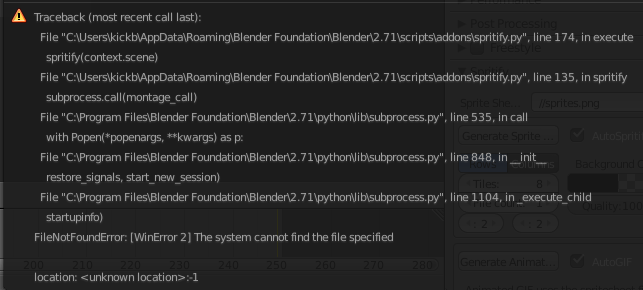

Re: [Guide] Making spritesheets with Blender
pancakeddd: Your problem is how you installed ImageMagick... 1/2 way througb there are a bunch of checkboxes, tick the one that mentions something like "legacy tools (e.g. convert)" and your problem should go away, that's what I ended up doing and it worked for me.


Re: [Guide] Making spritesheets with Blender
jkeywo wrote:pancakeddd: Your problem is how you installed ImageMagick... 1/2 way througb there are a bunch of checkboxes, tick the one that mentions something like "legacy tools (e.g. convert)" and your problem should go away, that's what I ended up doing and it worked for me.
Code: Select all
def find_bin_path_windows():
    import winreg

    REG_PATH = "SOFTWARE\ImageMagick\Current"

    try:
        registry_key = winreg.OpenKey(winreg.HKEY_LOCAL_MACHINE, REG_PATH, 0,
                                       winreg.KEY_READ)
        value, regtype = winreg.QueryValueEx(registry_key, "BinPath")
        winreg.CloseKey(registry_key)

    except WindowsError:
        return None

return valuePS: Blender Cycles Asset
Last edited by darkfrei on Fri May 18, 2018 4:06 pm, edited 2 times in total.
Re: [Guide] Making spritesheets with Blender
Also, for spritify you can use this tool: Just insert yours sprites and start the .bat-file what you need or make the new one.
Make this code, then it's not crop sprite at 128 pixels anymore. And it makes one sprite sheet with 8 columns.
With 8 raws:
Code: Select all
montage "Sprites/file*.png" -geometry +0+0 -tile 8x -background rgba(0,0,0,0) -quality 100% Sprite_x_8x.pngCode: Select all
montage "Sprites/file*.png" -geometry +0+0 -tile x8 -background rgba(0,0,0,0) -quality 100% Sprite_x_x8.pngRe: [Guide] Making spritesheets with Blender
If your sprites have too big alpha border, it can be cropped with this script:
Examples, code from this forum, a lot of thanks to GeeMack.
Pros: You are cut all alpha from sprites, so your spritesheet will have much tiny dimensions. All sprites have same dimensions, no pixel with graphics will be deleted.
How to use: place your sprites to Input folder and start .bat-file. Code for rotating clockwise 90 degree.
Mirroring
Code: Select all
magick "Input/*.png" -background none ^
   ( -clone 0--1 -layers merge ^
   -set option:cropper "%%[@]" +delete ) ^
   -crop %%[cropper] +repage ^
   MIFF:- | magick montage MIFF:- -background none ^
-tile 2x2 -geometry +0+0 Output\best_spritesheet_2x2.pngPros: You are cut all alpha from sprites, so your spritesheet will have much tiny dimensions. All sprites have same dimensions, no pixel with graphics will be deleted.
How to use: place your sprites to Input folder and start .bat-file. Code for rotating clockwise 90 degree.
Code: Select all
magick "Input/*.png" -background none ^
   -rotate 90 ^
Input/rotated_90_%%04d.pngCode: Select all
magick "Input/*.png" -background none ^
   -flop ^
Input/flop_%%04d.pnge-
JesseDGamer

- Manual Inserter
- Posts: 2
- Joined: Thu Jul 26, 2018 12:59 am
Re: [Guide] Making spritesheets with Blender
For people having trouble when trying to generate the sprite sheet, specifically when blender can't find the "montage.exe" file, here's a fix I did.
I replaced line 121 in the spritify.py file with the full path + file name of the montage.exe that ImageMagick installed : where it used to be
Idk for sure, but I think it has something to do with environment variables or something.
My problem now is that it's removing transparency from all the output images no matter what color I choose for the background... I've done a little research and found it might be a bug with montage.exe. Idk.
I replaced line 121 in the spritify.py file with the full path + file name of the montage.exe that ImageMagick installed :
Code: Select all
"C:\Program Files\ImageMagick-7.0.8-Q16\montage.exe",Code: Select all
"montage",My problem now is that it's removing transparency from all the output images no matter what color I choose for the background... I've done a little research and found it might be a bug with montage.exe. Idk.
Re: [Guide] Making spritesheets with Blender
Don't forget this part:JesseDGamer wrote:My problem now is that it's removing transparency from all the output images no matter what color I choose for the background... I've done a little research and found it might be a bug with montage.exe. Idk.
Code: Select all
-background none
Re: [Guide] Making spritesheets with Blender
darkfrei wrote: Wed Jan 17, 2018 9:45 pm If your sprites have too big alpha border, it can be cropped with this script:How to use: place your sprites to Input folder and start .bat-file.Code: Select all
magick "Input/*.png" -background none ^
   ( -clone 0--1 -layers merge ^
   -set option:cropper "%%[@]" +delete ) ^
   -crop %%[cropper] +repage ^
   MIFF:- | magick montage MIFF:- -background none ^
   -tile 2x2 -geometry +0+0 Output\best_spritesheet_2x2.png
Factorio_IMagick_best_spritesheet.7z
...
Thanks, very helpful!
Add more:
If you want like this
- fi-basic-farmland_07_4x.jpg (209.37 KiB) Viewed 14287 times
Code: Select all
magick "Input/*.png" -background none ^
   ( -clone 0--1 -layers merge ^
   -set option:cropper "481x337+328+315" +delete ) ^
   -crop %%[cropper] +repage ^
   MIFF:- | magick montage MIFF:- -background none ^
   -tile 2x2 -geometry +0+0 Output\best_spritesheet_2x2.png
pause
And, for making icon 128x128 use this:
Code: Select all
magick "Input/*.png" -background none ^
   ( -clone 0--1 -layers merge ^
   -set option:cropper "%%[@]" +delete ) ^
   -crop %%[cropper] +repage ^
   MIFF:- | magick convert MIFF:- -background none ^
   -adaptive-resize 128x128 -gravity center -extent 128x128 best_icon_128b.png
pause
- best_icon_128b.png (22.44 KiB) Viewed 14281 times
Re: [Guide] Making spritesheets with Blender
I hate bumping up very old threads, but my search through the forums hasn't been very good.
Blender recently had a major update to their UI, and I'm wondering if anything in this thread no longer applies (I noticed in the images it uses Blender Internal which doesn't exist anymore)
Blender recently had a major update to their UI, and I'm wondering if anything in this thread no longer applies (I noticed in the images it uses Blender Internal which doesn't exist anymore)
-
gabberworld
- Long Handed Inserter
- Posts: 70
- Joined: Sat Aug 17, 2019 11:06 pm
- Contact:
Re: [Guide] Making spritesheets with Blender
seems way too complicated, and too much work
but i guess everyone sees this different as there different methods how todo this at blender
but i guess everyone sees this different as there different methods how todo this at blender
-
gabberworld
- Long Handed Inserter
- Posts: 70
- Joined: Sat Aug 17, 2019 11:06 pm
- Contact:
Re: [Guide] Making spritesheets with Blender
there is one thing, even if blender have new update, it not meas you must use that new oneKalshion wrote: Tue Oct 22, 2019 7:24 pm I hate bumping up very old threads, but my search through the forums hasn't been very good.
Blender recently had a major update to their UI, and I'm wondering if anything in this thread no longer applies (I noticed in the images it uses Blender Internal which doesn't exist anymore)
im still using the 2.79 and not see why i should use the new one
Re: [Guide] Making spritesheets with Blender
Great! here goes my bookmark. I'm a newbie at 3d modelling, but I will try my best and maybe create something worthwhile.
-
jmattspartacus
- Burner Inserter
- Posts: 5
- Joined: Sat Jul 09, 2016 2:59 am
- Contact:
Re: [Guide] Making spritesheets with Blender
So, Blender has a number of things that are different/not working from this tutorial, but they're easy enough to get around.
Firstly, changing background to transparent in 2.8 has to be done something like
https://blender.stackexchange.com/quest ... d-in-eevee
Secondly, the shadow receiver plane doesn't work with the new default render engine, and I haven't figured that out yet.
Lastly, the spritify tool wasn't working for 2.8, so I updated it
https://github.com/jmattspartacus/blender_spritify
I'll make a separate forum post about updating it.
Firstly, changing background to transparent in 2.8 has to be done something like
https://blender.stackexchange.com/quest ... d-in-eevee
Secondly, the shadow receiver plane doesn't work with the new default render engine, and I haven't figured that out yet.
Lastly, the spritify tool wasn't working for 2.8, so I updated it
https://github.com/jmattspartacus/blender_spritify
I'll make a separate forum post about updating it.