Page 1 of 1
Red and Green blueprint books (deconstruction/upgrade)
Posted: Wed Sep 30, 2026 12:48 pm
by worph

- grafik.png (7.93 KiB) Viewed 189 times

- grafik.png (7.98 KiB) Viewed 189 times

- grafik.png (7.97 KiB) Viewed 189 times
TL;DR:
If a blueprint book only contains deconstruction or upgrade plans, it should change the color of the book to red/green respectively.
WHY:
First of all, it would look cool. It also shouldn't be very much work at all.
But more importantly, visual clarity!
Can you spot which is my deconstruction blueprint book? I know where it is, but my eyes always get caught on other deconstruction plans or even other more red items. My deconstruction book is arguably among the least red items in the second toolbars.

- grafik.png (38.78 KiB) Viewed 189 times
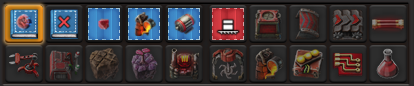
- grafik.png (50.36 KiB) Viewed 189 times
(exaggerated just for illustrative purposes)
Re: Red and Green blueprint books (deconstruction/upgrade)
Posted: Wed Sep 30, 2026 1:37 pm
by Alfonse215
Note that if you don't use an icon for a blueprint book, it will use the image from the currently selected blueprint. If that one is a deconstruction planner, it'll use that. I use this for my deconstruction and upgrade blueprint books.
Re: Red and Green blueprint books (deconstruction/upgrade)
Posted: Wed Sep 30, 2026 2:40 pm
by worph
Alfonse215 wrote: Wed Sep 30, 2026 1:37 pm
Note that if you don't use an icon for a blueprint book, it will use the image from the currently selected blueprint.
I did not know that. Maybe because icons are mandatory for normal blueprints themselves, so I never tried it. I will do that right away.
I still like my suggestion though
