Page 106 of 107
Re: Simple Questions and Short Answers
Posted: Wed Jul 01, 2026 5:14 pm
by Loewchen
kitters wrote: Wed Jul 01, 2026 2:54 pm
Why biters hatched from eggs despawn? Is there a way to ake them form a nest?
If they have no orders or cannot path to their destination they despawn after a while to save performance. Egg hatched enemies cannot create nests.
Re: Simple Questions and Short Answers
Posted: Wed Jul 01, 2026 5:26 pm
by kitters
Loewchen wrote: Wed Jul 01, 2026 5:14 pm
kitters wrote: Wed Jul 01, 2026 2:54 pm
Why biters hatched from eggs despawn? Is there a way to ake them form a nest?
If they have no orders or cannot path to their destination they despawn after a while to save performance. Egg hatched enemies cannot create nests.
I remember reading somewhere, maybe wiki, that legendary biters from legendary eggs can potentially join expansion group and turn into legendary nest. Have anybody heard of it?
Re: Simple Questions and Short Answers
Posted: Wed Jul 01, 2026 8:41 pm
by Jap2.0
kitters wrote: Wed Jul 01, 2026 5:26 pm
Loewchen wrote: Wed Jul 01, 2026 5:14 pm
kitters wrote: Wed Jul 01, 2026 2:54 pm
Why biters hatched from eggs despawn? Is there a way to ake them form a nest?
If they have no orders or cannot path to their destination they despawn after a while to save performance. Egg hatched enemies cannot create nests.
I remember reading somewhere, maybe wiki, that legendary biters from legendary eggs can potentially join expansion group and turn into legendary nest. Have anybody heard of it?
I don't think wild nests can have quality. There is a bit of relevant discussion at
118842.
Re: Simple Questions and Short Answers
Posted: Fri Jul 03, 2026 9:44 pm
by kitters
Is there a way to locate to tear down that old nasty radar that unnecessary occupies the needed frequency?
If not, it's gonna be a problem in the future.
Re: Simple Questions and Short Answers
Posted: Fri Jul 03, 2026 9:57 pm
by Jap2.0
kitters wrote: Fri Jul 03, 2026 9:44 pm
Is there a way to locate to tear down that old nasty radar that unnecessary occupies the needed frequency?
If not, it's gonna be a problem in the future.
Go to the map, ctrl + F radar will show you all radars on a given planet. That's as close as I know of.
Re: Simple Questions and Short Answers
Posted: Mon Jul 13, 2026 10:58 am
by BlackHat
Is there a way to make the ToolTip window pop up without having to hold the Shift key?
I took about a year long break from Factorio and just started again after updating to 2.1.9
The first thing I noticed was the ToolTip window below the mini-map was gone and I could not figure out why.
Figured it was a mod conflict as I had "edited" some of the .json from 2.0 to 2.1, then spent some time removing various mods to track down the problem. (That did not work)
TLDR, Googling, I found a Tips video reminding me to "dock" the ToolTip window under the mini-map.
BUT... I also saw I had to HOLD the SHIFT key to make it appear.
Hmm...... It has been a year (veggie brain) and I overwrote my 2.0 version so could not go back and check, but, was it always that way???
Is there some hotkey editing I can do, to make it so I DON'T need to hold down shift to see the tool tip?
Thanks
BlackHat
Re: Simple Questions and Short Answers
Posted: Mon Jul 13, 2026 1:39 pm
by Loewchen
BlackHat wrote: Mon Jul 13, 2026 10:58 am
Is there a way to make the ToolTip window pop up without having to hold the Shift key?
In settings > Interface > Tooltip delay, change it to a lower value.
Re: Simple Questions and Short Answers
Posted: Mon Jul 13, 2026 10:55 pm
by BlackHat
Loewchen wrote: Mon Jul 13, 2026 1:39 pm
BlackHat wrote: Mon Jul 13, 2026 10:58 am
Is there a way to make the ToolTip window pop up without having to hold the Shift key?
In settings > Interface > Tooltip delay, change it to a lower value.
Already had it set to 0ms.
BUT... when I changed the "Entity Tool tip" below it, from Never to 0ms, it worked. I don't need to press SHIFT to make the tool tip to appear, just mousing over objects and items pops up the info tool tip.
Thanks,
BlackHat
Re: Simple Questions and Short Answers
Posted: Tue Jul 14, 2026 11:18 pm
by Tyrannosapien
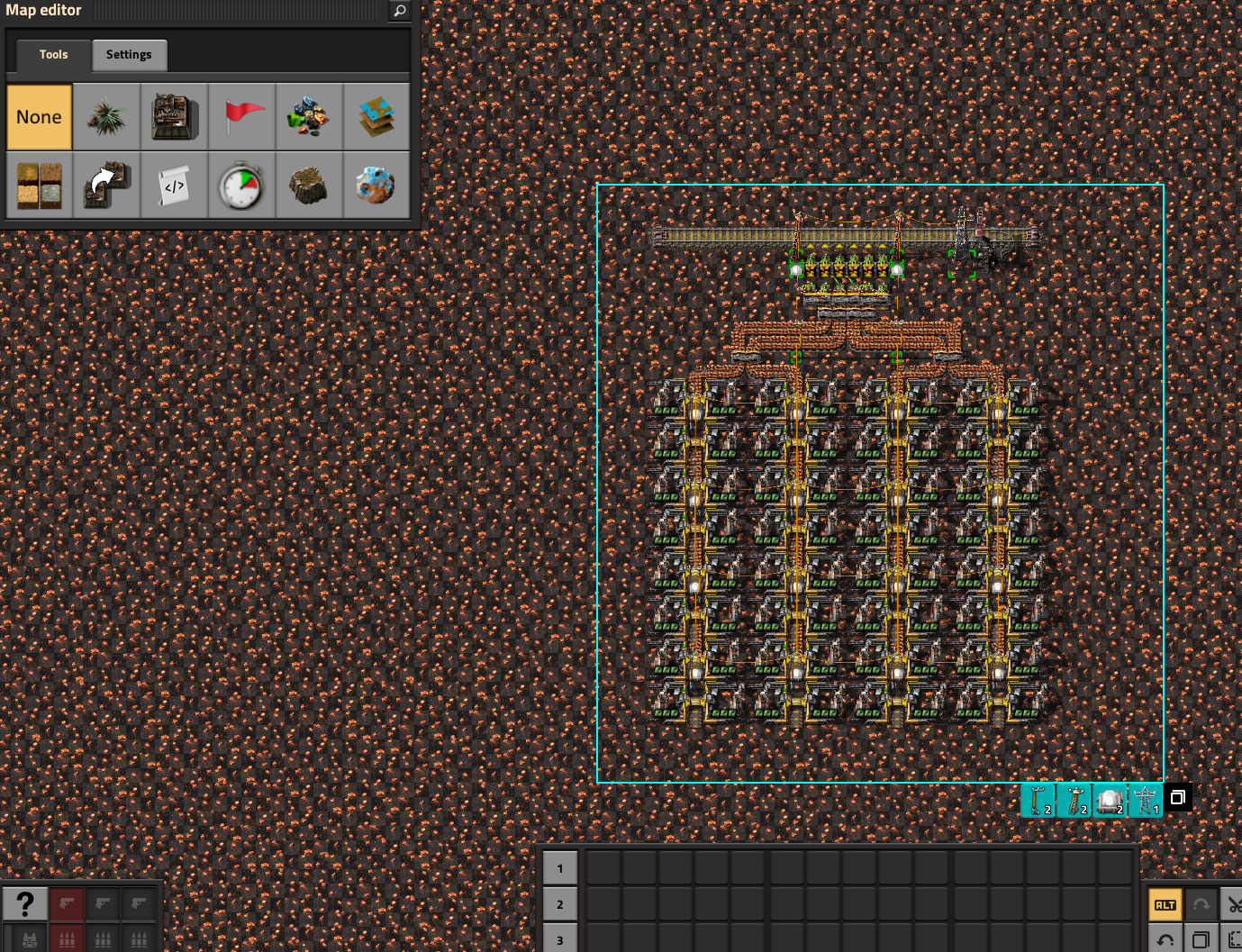
The editor mode won't select the entities I placed before I saved the editor session. Please tell me what I'm doing wrong, or if I broke it, how so I don't break it again.
I created a new editor session with all default game settings. After it loaded, I cleared all entities, changed to lab tiles, and then stamped a 250 square of copper. I created an array of miners and 3 similar blueprints in a new blueprint book. I ran the simulation for a bit confirming that the belts were complete, etc. Then I Save As a new file, then exited. I loaded up my current game and stamped a few copies of the BP, and then I decided to add some additional poles and lights.
Next I used the editor to Edit Scenario that I had just created a few minutes prior. I added a few new entities that I wanted in an updated blueprint. But when I went to select my updated design with the BP editor, the selection cursor only selects the new entities I just added. Those I added before the save are ignored, as if they are decoratives. The same effect happens if I try to select with Ctrl-C or Ctrl-X, only the post-saved entities are selected. I have restarted several times and created new saves with additional entities. In all cases, the miners and related entities I placed before the first save can never be selected, only those after the initial re-load of that save.
I also tried to recreate by running a new scenario in the editor, but I can't recreate this failure to select entities in the new save.
I'm running the latest 2.1 experimental build.
edit: here's a screenshot:
- Screenshot 2026-07-14 160517.png (2.61 MiB) Viewed 2687 times
Re: Simple Questions and Short Answers
Posted: Wed Jul 15, 2026 12:04 am
by robot256
Tyrannosapien wrote: Tue Jul 14, 2026 11:18 pm
The editor mode won't select the entities I placed before I saved the editor session. Please tell me what I'm doing wrong, or if I broke it, how so I don't break it again.
I created a new editor session with all default game settings. After it loaded, I cleared all entities, changed to lab tiles, and then stamped a 250 square of copper. I created an array of miners and 3 similar blueprints in a new blueprint book. I ran the simulation for a bit confirming that the belts were complete, etc. Then I Save As a new file, then exited. I loaded up my current game and stamped a few copies of the BP, and then I decided to add some additional poles and lights.
Next I used the editor to Edit Scenario that I had just created a few minutes prior. I added a few new entities that I wanted in an updated blueprint. But when I went to select my updated design with the BP editor, the selection cursor only selects the new entities I just added. Those I added before the save are ignored, as if they are decoratives. The same effect happens if I try to select with Ctrl-C or Ctrl-X, only the post-saved entities are selected. I have restarted several times and created new saves with additional entities. In all cases, the miners and related entities I placed before the first save can never be selected, only those after the initial re-load of that save.
I also tried to recreate by running a new scenario in the editor, but I can't recreate this failure to select entities in the new save.
I'm running the latest 2.1 experimental build.
edit: here's a screenshot:
Screenshot 2026-07-14 160517.png
Are the new entities you placed assigned to a different force from the old entities? It sounds like during either the first or second session, you forgot to change the editor force from "Auto (enemy)" to "player".
Re: Simple Questions and Short Answers
Posted: Wed Jul 15, 2026 12:43 am
by Tyrannosapien
robot256 wrote: Wed Jul 15, 2026 12:04 am
Are the new entities you placed assigned to a different force from the old entities? It sounds like during either the first or second session, you forgot to change the editor force from "Auto (enemy)" to "player".
Thanks so much, that is the problem somehow. I'm not sure what I touched as I was clicking through those dialogs the first time. But now playing around with the force editor I can select all items again. I don't fully understand it, but hopefully I'll remember to keep hands off there

Re: Simple Questions and Short Answers
Posted: Thu Aug 06, 2026 8:53 am
by EvilPLa
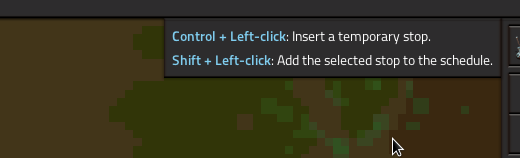
Can I disable these Keyboard hints in Mapview when sitting in a train somehow? The setting in the Interface menu is already disabled, but this hints seems not connected to that setting.
- 08-06-2026, 10-51-45.png (12.05 KiB) Viewed 2197 times
Re: Simple Questions and Short Answers
Posted: Thu Aug 06, 2026 4:22 pm
by jdrexler75
As expected 2.1 broke a lot of my machines with both input and outputs.
Is there a simple way to find or highlight the machines with both active input and output signals? Maybe a console script or blueprint analyzer? I'm going crazy trying to find all of them on all the planets and ships... I have too many wires.
Re: Simple Questions and Short Answers
Posted: Fri Aug 07, 2026 2:51 pm
by darkgrim88
Can someone explain why my train won't go to the waiting bay of the station?

Re: Simple Questions and Short Answers
Posted: Fri Aug 07, 2026 6:35 pm
by Loewchen
darkgrim88 wrote: Fri Aug 07, 2026 2:51 pm
Can someone explain why my train won't go to the waiting bay of the station?
You have not signaled the straight path to the station so it is bidirectional by default and shorter than the bypass so the train has no incentive to use the bypass. Signal the straight path direction west only to avoid that.
Re: Simple Questions and Short Answers
Posted: Fri Aug 07, 2026 10:18 pm
by kachaum
Platform-to-platform issue.
Currently I have a ship transfering artillery shells from Vulcanus to my Nauvis stationary HUB, it transfers the shells as supposed to from ship to HUB, but after it my Gleba ship is supposed to recieve those transfers from the HUB and take the shells to Gleba, the request is set to accept from Nauvis platforms and the HUB is set to provide to other platforms.
The HUB tells there is 0 shells available on platforms while having 40 shells on its cargo and it doesnt transfers it at all. The Gleba ship while parked on Nauvis tells the same thing, no shells available on platforms... what is the issue here? a bug? a platform wont transfer unless it have surplus from the request? I cant figure it out.
Edit: set the Gleba ship request to ALL instead of platform and it worked, probably a bug since there were 0 arty shells on nauvis surface.
Edit2: The problem persists somehow, at this point I have no clue. That single delivery worked when I changed to ALL and it ceased to work after it.
Re: Simple Questions and Short Answers
Posted: Sat Aug 08, 2026 9:31 am
by spinba11
Is there a way to cancel building upgrades requests?
We can do it with module requests into buildings but I haven’t found a way to do it with actual building
The “item request slot” filter works on modules, I think there should be an equivalent for building upgrades.
Re: Simple Questions and Short Answers
Posted: Sat Aug 08, 2026 10:28 am
by Tertius
kachaum wrote: Fri Aug 07, 2026 10:18 pm
Platform-to-platform issue.
Currently I have a ship transfering artillery shells from Vulcanus to my Nauvis stationary HUB, it transfers the shells as supposed to from ship to HUB, but after it my Gleba ship is supposed to recieve those transfers from the HUB and take the shells to Gleba, the request is set to accept from Nauvis platforms and the HUB is set to provide to other platforms.
The HUB tells there is 0 shells available on platforms while having 40 shells on its cargo and it doesnt transfers it at all. The Gleba ship while parked on Nauvis tells the same thing, no shells available on platforms... what is the issue here?
As far as I understand the platform request mechanic, it's working as designed. If there is a platform with a request for some item from some platform in orbit of a planet, the platform will not offer this item to other platforms in orbit of that planet. This is to avoid item ping pong. If you want to offer a requested item to other platforms in orbit of the same planet, the request must vanish. You can do this by creating requests dynamically with the circuit network that raises the request only if the supplying platform arrived in orbit.
Re: Simple Questions and Short Answers
Posted: Sat Aug 08, 2026 4:58 pm
by kpreid
spinba11 wrote: Sat Aug 08, 2026 9:31 am
Is there a way to cancel building upgrades requests?
It works the same way as cancelling deconstruction. Take the upgrade planner and select the buildings while holding Shift (or whatever you have rebound to "Select for deconstruction cancellation").
Re: Simple Questions and Short Answers
Posted: Mon Aug 31, 2026 7:24 am
by ManicDee
How do I switch ammunition in Spidertron launchers while in remote view?
Given a spidertron with all four launchers loaded with rockets, I would like to switch ammunition so that one launcher has rockets, one launcher has explosive rockets, one has capture bots, and one has atombic bombs.
The advice I have seen includes:
- Always be in logistics range and use ghost cursors to place the ammunition. This means the ammunition will be loaded from the local logistics network, not taken from the Spidertron inventory. This doesn't work if the spidertron is outside a logistics network, or the local logistics network doesn't have the required ammunition.
- Walk up to the spidertron and manually switch ammunition using drag-and-drop from the engineer's inventory.
- Create the blueprint with the required ammunition loaded, construct the spidertron so that it has the required ammunition, then deconstruct it when it runs out of ammunition.
Is there another way to switch ammunition for spidertron launchers?