Page 1 of 1
Show train visualization in both directions
Posted: Sun Mar 08, 2020 8:11 pm
by tamanous
What?
Currently, the train visualization is show only in the direction the train comes from. I'd like to see this changed to both ways, or have the option to decide which directions are shown in [settings] - [interface].
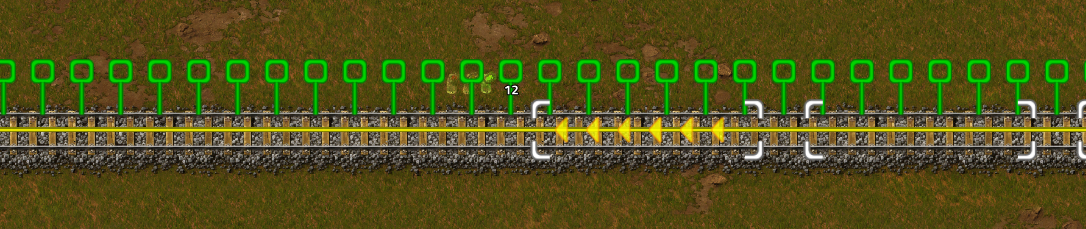
- train visualisation.jpg (449.36 KiB) Viewed 5322 times
Why?
From time to time, when placing signals manually, I need to preview the train visualization in the direction the train is going to. Like when manually setting a waiting bay.
See also:
Display wagon count in signal-preview
Color the last train wagon indicator when placing signals or stations
Re: Show train visualization in both directions
Posted: Mon Mar 09, 2020 12:17 pm
by Xelephant
The visualization is dependent on Signal placement, if you placed a Signal already on the Track the train can only in one way. If you place two Signals next to each other at the start of your station you can switch previews of the wagons by switching the side of the old signal.
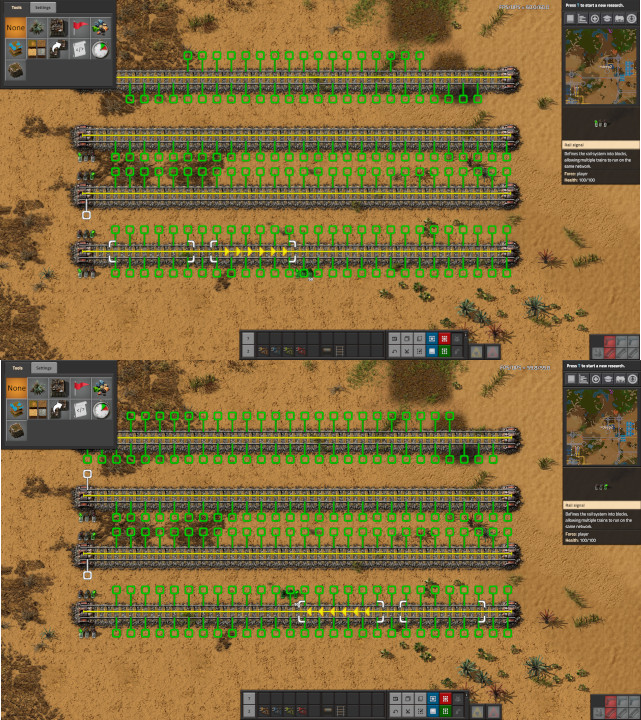
- rails2.jpg (257.96 KiB) Viewed 5295 times
Re: Show train visualization in both directions
Posted: Mon Mar 09, 2020 2:49 pm
by netmand
Xelephant wrote: Mon Mar 09, 2020 12:17 pm
The visualization is dependent on Signal placement, if you placed a Signal already on the Track the train can only in one way. If you place two Signals next to each other at the start of your station you can switch previews of the wagons by switching the side of the old signal.
rails2.jpg
This is not what he is asking, because I want the same thing.
What he is asking is to be able to see preview ahead of the signal placement, not just behind.
edit: I'm using "he" generically, he could be a she...
Re: Show train visualization in both directions
Posted: Mon Mar 09, 2020 7:55 pm
by tamanous
Xelephant wrote: Mon Mar 09, 2020 12:17 pm
The visualization is dependent on Signal placement, if you placed a Signal already on the Track the train can only in one way. If you place two Signals next to each other at the start of your station you can switch previews of the wagons by switching the side of the old signal.
Thank you for that tip. Sadly, this does only work if the trains on the rails drive in both ways. But to me it seems, by looking at the forums at least, that a huge amount of players tend to use one-directional railway systems.
But a workaround using this technique would be to place one signal on the opposing side to the very next rail signal "as if it would be two-directional" to get the wanted preview - then remove that temporary signal again after placing the wanted signal. I do strongly believe, that putting my left hand index finger on the screen and getting my cursor there is faster and therefore better (except for my screen ... ).
Re: Show train visualization in both directions
Posted: Tue Mar 10, 2020 3:10 pm
by vorku
From what I understand, the goal is to easily place a signal "3 cars after the previous one" (for instance when separating trains in a waiting lane).
Currently, you have to hover over the previous signal, see where the third white box ends, and quickly put down a signal there. Then, hover over that signal, and so on.
The requested feature would be to show, when preparing to place a signal, where train cars stopped at the next signal in rolling direction would be located (basically, show where a train stopped at the next signals would be, in addition to where a train stopped at the current signal will be).
Re: Show train visualization in both directions
Posted: Tue Mar 10, 2020 4:03 pm
by valneq
+1 for adding the option to visualize a train waiting at the signal ahead
This would make signal placement so much easier
Re: Show train visualization in both directions
Posted: Sat Jul 04, 2026 11:39 pm
by Zaflis
+1
In example here i'd for example ask a question; "If i place a signal here, will 1-2 train fit in the block ahead?". If i place it too close to forward signal i'll need to remove and place it again further back, repeating until it fits. Or vice versa if too far then bring it closer to optimize the space for fit. Problem is i don't currently actually know that unless i highlight the signal on far right, and if i do that i lose track of where i was planning to place it.

- 07-05-2026, 02-35-56.png (535.37 KiB) Viewed 638 times
It's easy when you are placing a signal after another signal (traincar highlights), but it becomes a problem when placing it behind one when nothing is shown.
PS. The issue becomes even worse with curves, because if the forward signal has a different rotation than where you are trying to place it, you can't even highlight it unless you clear your hand with Q first. This is a known issue that is in category of "don't fix" ever since 2.0.
Re: Show train visualization in both directions
Posted: Sun Jul 05, 2026 12:43 am
by juliawtapp
there is an option for this that I always keep enabled in the f4 menu. "show-stock-positions-reverse"
Re: Show train visualization in both directions
Posted: Tue Jul 07, 2026 2:13 am
by macdjord
+1