Page 1 of 1
[Solved] How to change button width in 0.17?
Posted: Fri Mar 01, 2019 7:29 am
by Schallfalke
I am working on updating my mods to new version.
But I found the
default GUI style have changed. Notably, the button has gone unnecessarily elongated, which makes my 0.16 code looks bad.
How could I adjust the width of "button" type?
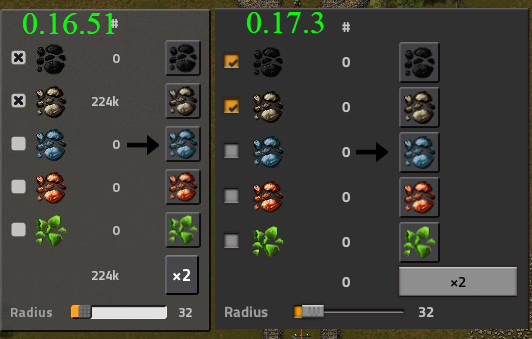
- 0.16.51 vs 0.17.3
- ButtonWidth.jpg (49.26 KiB) Viewed 1656 times
Re: How to change button width in 0.17?
Posted: Fri Mar 01, 2019 7:46 am
by Klonan
button.style.width, button.style.natural_width, button.style.minimal_width, button.style.maximal_width...
Take your pick
Re: How to change button width in 0.17?
Posted: Fri Mar 01, 2019 8:10 am
by darkfrei
Klonan wrote: Fri Mar 01, 2019 7:46 am
button.style.width, button.style.natural_width, button.style.minimal_width, button.style.maximal_width...
Take your pick
Is here in vanilla someone standard style button with compact size? Default compact text style?
Re: How to change button width in 0.17?
Posted: Fri Mar 01, 2019 8:54 am
by Schallfalke
Thank you.
Though the shrinked text button does not look as nice as in 0.16, like font change, button background colour, etc. I cannot find any documentation on default styles, so cannot mimic the original style fully.
Anyway, I will instead use a sprite button here, sounds much easier than fighting with style settings...
EDIT: Just found a lot of settings in core\prototypes\style.lua. I will see if there is anything I can use from there...