Page 1 of 2
Edit blueprint / Blueprint Creative Mode: Create/Edit/Test
Posted: Tue Jun 06, 2017 1:02 am
by BlackKnight
TL;DR: Create/Edit/Test Blueprints in new Creative Layer
Followed over from Suggestion [Versioning for blueprints]
viewtopic.php?f=6&t=48926
DemRat wrote:Given that placing ghosts is a thing, it'd be nice if we could use the same feature to add stuff to blueprints directly.
We can already have any imaginable blueprint anyway by simply creating it in another game and saving it locally, so it'd just make 'creating the right blueprint' or 'fixing this slightly wrong blueprint' easier.
This got me thinking.. Something like this could be very useful but manipulating items directly through the current blueprint interface could be quite cumbersome not to mention impossible for larger blueprints (everything would be extremely small)....
Enter Blueprint Creative Mode
A solution I envision would provide a "Limitless Construction Plane" - A layer outside the normal game layer with checkerboard background just like is used for tutorials.
Think of it as a virtual creative mode where anything is possible - limited only by what is currently researched.
Blueprint Creative Mode Details
- The player would not exist as its an entirely virtual interface. Just like god mode.
- Allow instant placement of items - not requiring a personal roboport or robots to place.
- Allow unlimited inventory of currently researched items -- so no crafting limitations.
- Would pause the game in single player just like the tutorials.
- Optionally a solution for testing throughput - with similar 'unlimited supply' buildings like are featured in the Creative Mode mod for testing throughput. Thus you wouldn't need to generate eg. electricity.
- Would feature easy to access/edit settings - blueprint label, blueprint icons, components within blueprint.
and Environment Setting: environment dimensions, movement speed, show grid... and likely many others.
As shown, additional settings could be expanded or collapsed to provide more space
- Optionally could have an option to select a an item from the Complainants List and replace it with another item (eg upgrade yellow belts with red belts) if space permits in the blueprint.
- Optionally would allow Duplicating blueprints allowing you to have multiple versions of a blueprint.
- Once happy with the design, you would click save and this would render into a blueprint and revert back to the normal view. You could also export the blueprint or delete and exit without saving.
- Optionally a map view - which may or may not be useful - just something players are used to.
- Would allow quickly testing a new imported blueprint to see if it would work for you before using it in game.
Mockup Image - For Full Size: [
download/file.php?id=26235], F11/FN+F11 for fullscreen
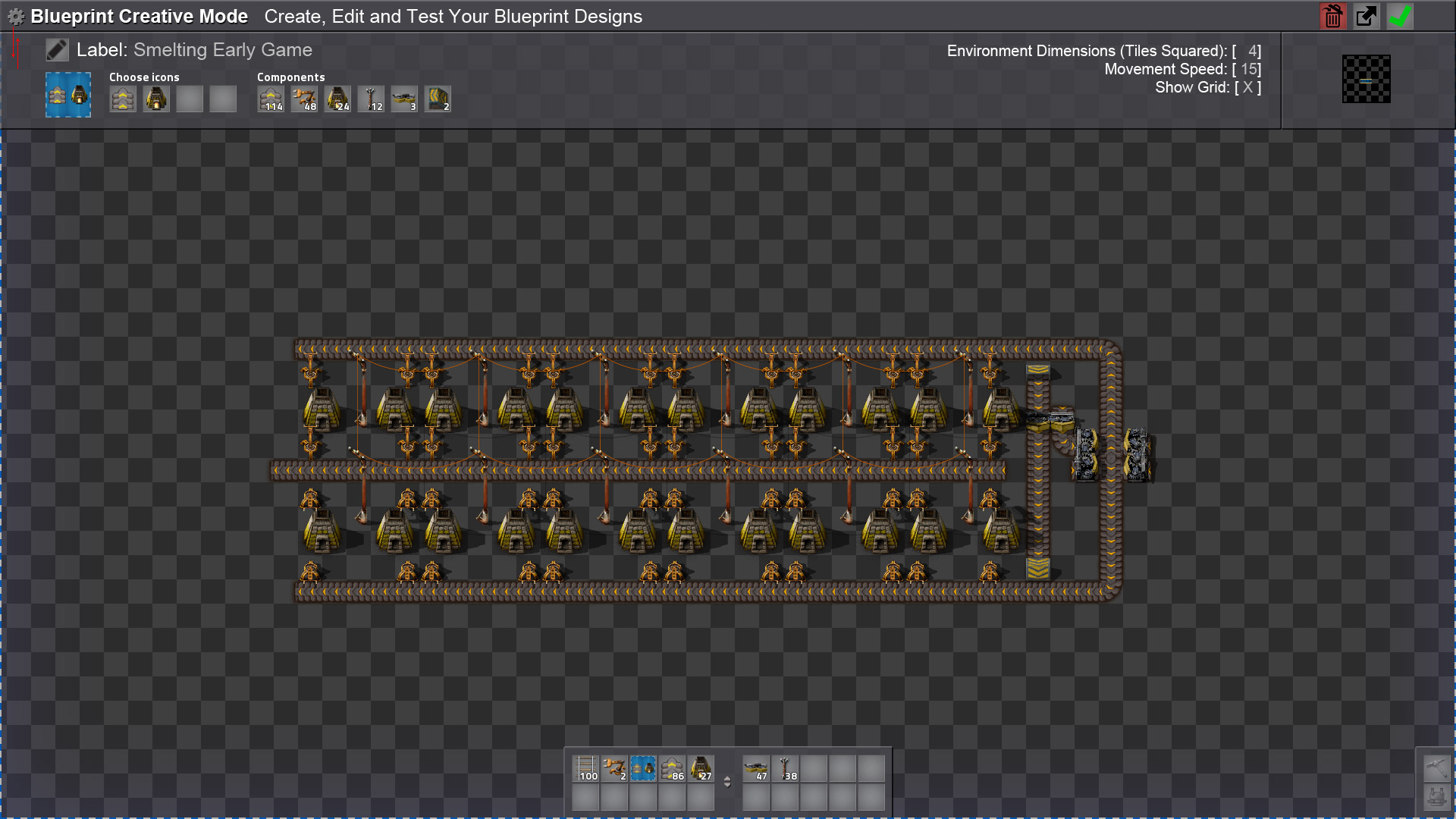
- Factorio-Suggestion-CreativeBlueprintMode.jpg (367.56 KiB) Viewed 13426 times
I have added a blue glow and marquee around the edge similar to what a blueprint looks like to give a sense you were actually working withing a blueprint.
Why This Is Different Than What The Present Game Offers
1 - Unlimited inventory for testing.
2 - Separate environment without anything in the way - trees/rocks/water/others parts of your factory.
3 - Option for tools like Creative Mode mod's for generating test throughput.
4 - Ghosting items and blocking robots from constructing is presently the only option close - the downside is 2 and 3 arent possible and ghosts are much harder to see clearly. They also can't be configured.
Edit: Clarity
Re: Blueprint Creative Mode: Create/Edit/Test [w concept image]
Posted: Mon Jun 26, 2017 9:05 pm
by ssilk
Added to
viewtopic.php?f=80&t=4682 Planning (Signs, Cloning, Ghosts, Blueprinting and more...)
Blueprint editor / Design whiteboard
Posted: Thu Sep 21, 2017 12:22 pm
by mrvn
TL;DR
I want to enter a blueprint, run around in it and construct or deconstruct items at will.
What ?
I'v used the Factorissimo mod, which has factory buildings that one can enter and work inside. I'm wondering if one couldn't make something like that for blueprints. You "enter" the blueprint and you get a new blank map with just the blueprint placed. The player inventory should get hidden and everything should be like in the sandbox with cheat mode on.
Ideally blueprinting should work and just place the entities. Deconstruction should be without delay (unlike sandbox, it's annoying there too).
On exit the blueprint would then contain the altered content, allowing one to quickly edit or even create a blueprint.
Why ?
I frequently look at a blueprint and think: Wouldn't it be better if that electric pole would be placed one tile to the left? Or shouldn't that inserter be a fast inserter. Then I have to place the blueprint somewhere, run around in it and alter the item, make a new blueprint, change the symbols and name it. That is a lot of work for just moving or replacing one item. Worse with construction robots because then they start actually building the ghosts and I have to deconstruct them again.
At other times I want to try a new layout for some part of the factory. Maybe it works, maybe it doesn't work. But placing down all the entities just to see that one should have moved a belt one tile over is tedious. So I would like to start with a blank blueprint, enter it and then design there without the limitations of the real game. When everything is as I wish I leave the blueprint and print it somewhere.
There have been several times where I saved the game, quit, opened a sandbox, experimented there and finally made a blueprint and imported it in the real game. My suggestion would mean this would no longer be necessary.
Re: Blueprint editor / Design whiteboard
Posted: Thu Sep 21, 2017 5:00 pm
by steinio
+1
Could be implemented as a surface.
Maybe an educated modder can provide an example.
Re: Blueprint editor / Design whiteboard
Posted: Thu Sep 21, 2017 5:29 pm
by Selvek
A quick fix would be to let you overwrite a blueprint, keeping the name and symbols while replacing the content. That would at least remove a couple steps from the awkward "blueprint editing" process. But a full edit capability like you described would be better.
Re: Blueprint editor / Design whiteboard
Posted: Thu Sep 21, 2017 10:38 pm
by Jap2.0
I think what they want is something like the option in
Cosmoteer when you upgrade your ship. I'm not certain (I haven't played the game, just seen a bit on Youtube) and I could be misunderstanding something, but I think it's a really cool idea.
Re: Blueprint editor / Design whiteboard
Posted: Mon Sep 25, 2017 9:02 am
by mrvn
steinio wrote:+1
Could be implemented as a surface.
Maybe an educated modder can provide an example.
Yeah, been thinking the same thing.
Re: Blueprint editor / Design whiteboard
Posted: Fri Oct 27, 2017 2:41 pm
by Bigfootmech
I'm doing something similar.
I may implement a "run around inside blueprint" way, way down the line. But for now, I'm just adding more commands to the existing blueprint editing screen.
viewtopic.php?f=97&t=53634
It's currently in its VERY infancy stages. Don't expect anything awesome. Or anything that won't potentially crash your game for that matter.
Re: Blueprint editor / Design whiteboard
Posted: Tue Jan 16, 2018 2:51 pm
by Blackt1g3r
I'd also like the Blueprint editor to allow you to set technology levels somehow. So you could hide things you wouldn't expect to have when you want to use the blueprint. For example, if I'm making a smelting blueprint I might want an "early game" version that doesn't have electric furnaces, only has yellow belts and inserters, etc.
Add/edit entities on blueprint
Posted: Fri May 17, 2019 6:05 am
by tannyr
When I'm making a blueprint, sometimes I have to remake my blueprints if I miss a power pole or want to upgrade to medium poles, upgrade inserters, etc...
Blueprint Editor / Factory Designer
Posted: Sun Nov 03, 2019 10:26 am
by Elecen
Hey guys,
what always frustrates me like crazy is building that component part of the factory and nearly when done building it I find out I needed to place it just 2 tiles further away. This occasionally leads me to "god mode" where I can build/design stuff faster, make a blueprint and bring it in the game. How about we can use blueprints as "design" editors? The functionality seems to kinda already exist in the tutorials (think rails tutorial, that grey "grid") so it could be a nice challenge both UX and coding wise.
What do you guys think?
Re: Blueprint Editor / Factory Designer
Posted: Sun Nov 03, 2019 12:24 pm
by mrvn
Try the TheBlueprintLab and PersistantBlueprints.
Re: Blueprint editor / Design whiteboard
Posted: Sun Nov 03, 2019 8:07 pm
by Koub
[Koub] Merged into older topic with same suggestion.
Re: Blueprint Editor / Factory Designer
Posted: Mon Nov 04, 2019 10:40 am
by mrvn
Elecen wrote: Sun Nov 03, 2019 10:26 am
Hey guys,
what always frustrates me like crazy is building that component part of the factory and nearly when done building it I find out I needed to place it just 2 tiles further away. This occasionally leads me to "god mode" where I can build/design stuff faster, make a blueprint and bring it in the game. How about we can use blueprints as "design" editors? The functionality seems to kinda already exist in the tutorials (think rails tutorial, that grey "grid") so it could be a nice challenge both UX and coding wise.
What do you guys think?
Actually this made me think of another feature I would like to have (a mod for): Moving a factory.
As you say "when done building it I find out I needed to place it just 2 tiles further away". Wouldn't it be great if you could select the factory and move it 2 tiles and then the construction bots would go and deconstruct the old and build the new BUT include all the contents? So an assembler holding 40 steel plates would get a proxy for 40 steel plates (I know that can be done) and the belts with copper ore would get filled with copper ore again (can that be done?). If I just cut&paste the factory I end up with all the coal, copper, iron, steel, ... in my inventory or storage chests.
Re: Blueprint Editor / Factory Designer
Posted: Tue Nov 05, 2019 7:01 am
by Pi-C
mrvn wrote: Mon Nov 04, 2019 10:40 am
Wouldn't it be great if you could select the factory and move it 2 tiles and then the construction bots would go and deconstruct the old and build the new BUT include all the contents?
So an assembler holding 40 steel plates would get a proxy for 40 steel plates (I know that can be done) and the belts with copper ore would get filled with copper ore again (can that be done?).
I imagine that could be quite messy. In setups with a main bus, there's not only the factory itself to move, but also the input from/output to the bus. In the best case (you split off a belt with both lanes holding the same resource, and the way from source belt to factory is clear) all you'd have to do is move a splitter and some undergrounds. Worst case? You need more than two input belts, some or all of them shared belts, and you have to move around other belts branching off the main bus or cliffs. So now you've moved your factory a couple of tiles, but they have no input/output. Would you trust a mod to do this automatically? It could get hard:
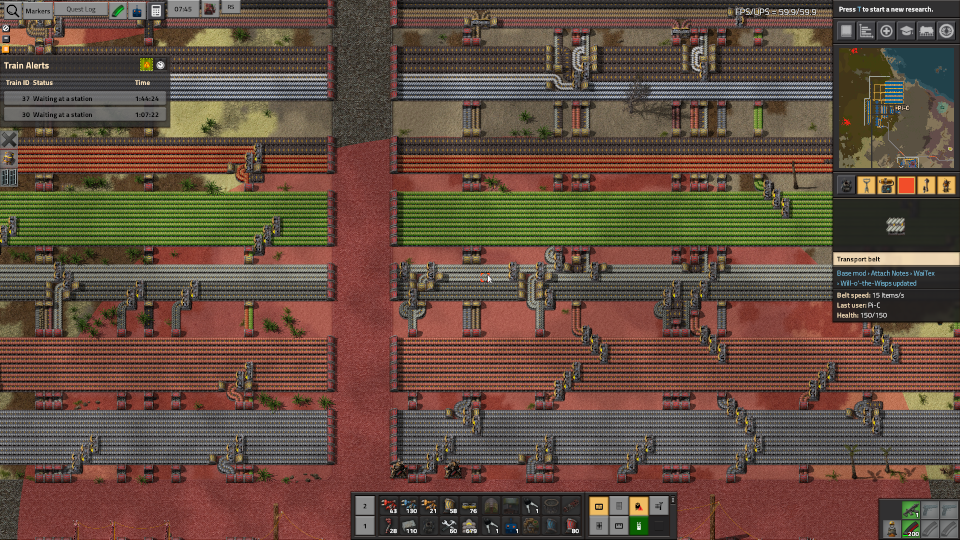
- moving_connections.png (1.07 MiB) Viewed 14783 times
Re: Blueprint editor / Design whiteboard
Posted: Wed Nov 06, 2019 7:20 am
by conn11
I am very much in favor of this proposition, modifying blueprints currently is highly annoying, because the necessity of manually having to change the name an icons. A update feature is needed, the obvious side effect is the ability to create blueprints in the editor from the ground up. Implementing features from the creative mod/ editor festures in there (like infinity chest for item X), could enhance playtesting and development of blueprints.
Re: Blueprint Editor / Factory Designer
Posted: Thu Nov 07, 2019 11:08 am
by mrvn
Pi-C wrote: Tue Nov 05, 2019 7:01 am
mrvn wrote: Mon Nov 04, 2019 10:40 am
Wouldn't it be great if you could select the factory and move it 2 tiles and then the construction bots would go and deconstruct the old and build the new BUT include all the contents?
So an assembler holding 40 steel plates would get a proxy for 40 steel plates (I know that can be done) and the belts with copper ore would get filled with copper ore again (can that be done?).
I imagine that could be quite messy. In setups with a main bus, there's not only the factory itself to move, but also the input from/output to the bus. In the best case (you split off a belt with both lanes holding the same resource, and the way from source belt to factory is clear) all you'd have to do is move a splitter and some undergrounds. Worst case? You need more than two input belts, some or all of them shared belts, and you have to move around other belts branching off the main bus or cliffs. So now you've moved your factory a couple of tiles, but they have no input/output. Would you trust a mod to do this automatically? It could get hard:
moving_connections.png
Nothing automatic there. You would select the part of the main bus for the factory and move it 2 tiles. The Idea with the move would be though that all the items picked up from the main bus belts on deconstruction would be put back onto the transport belts when they are put back.
I'm not sure item proxies work with belts and even if they do can you specify the side of the belt to populate? Might not work at all or not for mixed belts. But I can deal with items from the main bus with a chest and a loader to put it back on the belts.
What I find most annoying is assemblers with "catalysts". For example in Angels you have filtration plants that need filters and you can refurbish used filters in an assembler. 2 filtration plant with an assembler in the middle works nicely. Dump 20 filters in the assembler and it runs in a closed loop. But when you cut&paste the factory you have to run around and manually put 20 filters back into every assembler.
Re: Blueprint editor / Design whiteboard
Posted: Sat Nov 09, 2019 7:42 am
by ssilk
I like the idea of the blueprint editor. It is suggested many times, and some modders have tried it - but till now not with pouch luck. It seems quite complicated.
The idea of reconstructing a factory with all ingredients is interesting, but it should be an extra post, cause off-topic here. The argument that I don’t need to refill a cycled production: in my opinion it’s always possible to create a factory part so, that it will automatically refill.
better blueprint edit
Posted: Mon Feb 21, 2022 11:12 pm
by nuhll
Hi,
i suggest the following while being in blueprint edit mode:
1.) zoom blueprints (like mouse wheel, so you can actually see what youre doing on big blueprints)
2.) drag right and left click to allow / disallow (instead of pressing every square)
3.) would it be somehow possible to auto place landfill under items? (when placed on water, like a checkbox "auto landfill" while placing blueprints)?
Thanks
Re: better blueprint edit
Posted: Tue Feb 22, 2022 10:25 am
by jodokus32
There was this mod, which is now deprecated:
https://mods.factorio.com/mod/Edit-Blueprints
I currently do it quite similar by having a parallel editor savefile (/editor), where I can place and edit my blueprints (from blueprint library) in real world in creative mode and then recapture the blueprint (select new content).
It sucks a bit to switch the save, but its also a good way to save blueprints apart from the blueprint library.