Page 1 of 1
Hold Mouse Button to Evacuate!
Posted: Fri Jul 31, 2026 10:41 am
by CheeseMcBurger
TL;DR
Hold Mouse Button to Evacuate items from containers
What?
If you want to evacuate items from a container, you must click all cells individually.
Instead, it would be great if you could just hold down the mouse button and hover over the cells you want evacuated. Same way like deconstructing items in the world works.
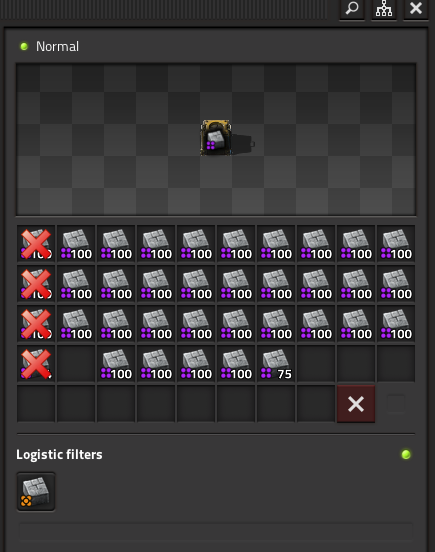
- 07-31-2026, 12-39-28.png (45.45 KiB) Viewed 638 times
Why?
Because it helps with carpal tunnel syndrome.
Re: Hold Mouse Button to Evacuate!
Posted: Fri Jul 31, 2026 10:44 pm
by Kerfaigar
+1
I can imagine someone arguing that doing stuff manually is meant to be more tedious, but the very fact that you're paying any attention to something that might have been otherwise automated is enough tediousness in my opinion. UI should introduce as little friction as possible.
Re: Hold Mouse Button to Evacuate!
Posted: Sat Aug 01, 2026 1:29 pm
by angramania
It is already possible to move all items or all stacks of specific item between inventory and container in a single click. Why drag?
Re: Hold Mouse Button to Evacuate!
Posted: Sat Aug 01, 2026 1:39 pm
by eugenekay
angramania wrote: Sat Aug 01, 2026 1:29 pm
It is already possible to move all items or all stacks of specific item between inventory and container in a single click. Why drag?
You can use Ctrl+Click while in
Character Mode ("in the world") to empty an entire Chest; but this does not work in
Remote View.
You can use Right-Click while in Remote View to place a "Remove Items" order (Red X), but you need to Right-Click each cell of the Container - which is repetitive. I usually just deconstruct the entire chest instead....
This request is about being able to empty an entire Chest/Container as a single order.
Re: Hold Mouse Button to Evacuate!
Posted: Sat Aug 01, 2026 4:26 pm
by angramania
eugenekay wrote: Sat Aug 01, 2026 1:39 pm
but this does not work in
Remote View.
Oh, I see. Thanks for explanation
Re: Hold Mouse Button to Evacuate!
Posted: Sun Aug 02, 2026 4:55 am
by redrook
+1