How to change a second item's name
Posted: Wed May 20, 2026 4:29 am
Hi, im new to factorio modding and modding in general, after reading the tutorial at https://wiki.factorio.com/Tutorial:Modd ... al/Gangsir I moved on to trying to add a second item, a modded assembler. Problem is, despite following the tutorial to the best of my ability, this new item's name refuses to change like the first. It is still stuck as "assembling-machine-1" when it should be "farm".
data.lua
locale/en/words.cfg
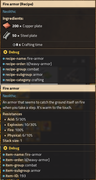
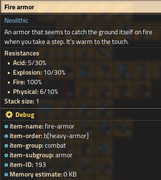
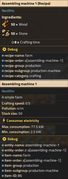
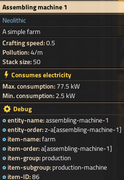
tl;dr: how change green "assembling machine 1" to "farm"
(also, the new "farm" item loses its tint after being placed. Why does it do that and how do you get it to keep the tint)
data.lua
Code: Select all
--data.lua

local farmBasic = table.deepcopy(data.raw["item"]["assembling-machine-1"])

farmBasic.name = "farm"
farmBasic.icons = {
  {
    icon = farmBasic.icon,
    icon_size = farmBasic.icon_size,
    tint = {r=0,g=.9,b=0,a=0.3}
  },
}


-- create the recipe prototype from scratch
local recipe = {
  type = "recipe",
  name = "farm",
  enabled = true,
  energy_required = 8, -- time to craft in seconds (at crafting speed 1)
  ingredients = {
    {type = "item", name = "wood", amount = 50},
    {type = "item", name = "stone", amount = 50}
  },
  results = {{type = "item", name = "farm", amount = 1}}
}

data:extend{farmBasic, recipe}

local fireArmor = table.deepcopy(data.raw["armor"]["heavy-armor"]) -- copy the table that defines the heavy armor item into the fireArmor variable

fireArmor.name = "fire-armor"
fireArmor.icons = {
  {
    icon = fireArmor.icon,
    icon_size = fireArmor.icon_size,
    tint = {r=1,g=0,b=0,a=0.3}
  },
}

fireArmor.resistances = {
  {
    type = "physical",
    decrease = 6,
    percent = 10
  },
  {
    type = "explosion",
    decrease = 10,
    percent = 30
  },
  {
    type = "acid",
    decrease = 5,
    percent = 30
  },
  {
    type = "fire",
    decrease = 0,
    percent = 100
  }
}

-- create the recipe prototype from scratch
local recipe = {
  type = "recipe",
  name = "fire-armor",
  enabled = true,
  energy_required = 8, -- time to craft in seconds (at crafting speed 1)
  ingredients = {
    {type = "item", name = "copper-plate", amount = 200},
    {type = "item", name = "steel-plate", amount = 50}
  },
  results = {{type = "item", name = "fire-armor", amount = 1}}
}

data:extend{fireArmor, recipe}
Code: Select all
[item-name]
fire-armor=Fire armor
farm=Farm


[item-description]
fire-armor=An armor that seems to catch the ground itself on fire when you take a step. It's warm to the touch.
farm=A simple farm
tl;dr: how change green "assembling machine 1" to "farm"