Page 1 of 1
Control behavior GUIs: Clicking inactive elements should activate them, when possible
Posted: Tue May 19, 2026 10:06 am
by HeliGungir
TL;DR
Clicking a slider, signal, or text element should enable it, when possible.
Example 1
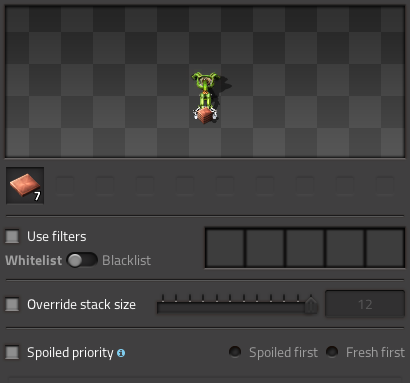
- 05-19-2026, 04-46-38.png (27.85 KiB) Viewed 1632 times
- Clicking one of the filter slots should enable "Use filters" and open the "Select a filter" GUI.
- Clicking the whitelist/blacklist toggle should enable "Use filters".
- Clicking the slider should tick enable "Override stack size".
- Clicking Spoiled first should enable "Spoiled priority".
Example 2
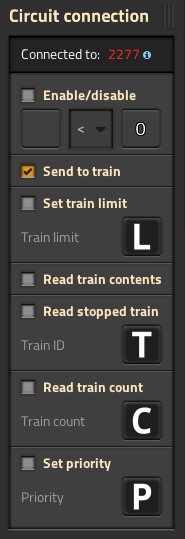
- 05-19-2026, 04-49-33.png (30.45 KiB) Viewed 1632 times
- Clicking the signal selection boxes preconfigured to L, T, C, P should enable the respective control behavior and open the "Select a signal" GUI.
- Clicking either signal selection box or the comparison operator should enable "Enable/disable" and open the respective configuration GUI.
Why?
This streamlines interaction. It's a bit annoying that we need to click twice, first to enable a GUI element, then to configure it. In many cases, the amount of clicking we have to do can be cut in half.
Re: Control behavior GUIs: Clicking inactive elements should activate them, when possible
Posted: Tue May 19, 2026 11:49 am
by Stringweasel
+1
I've lost count about the amount of times I've clicked on an inserters filter only to realize it's not enabled yet.
Re: Control behavior GUIs: Clicking inactive elements should activate them, when possible
Posted: Thu May 21, 2026 7:05 pm
by Hurkyl
Here's another variation that could be streamlined.
Setting: I have "use filters" unchecked. There are filters in the list.
Goal: To have "use filters" unchecked. To have the filter list empty.
Actual action: Check "use filters". Right-click filter entries to clear them. Uncheck "use filters".
Desired action: just right-click to clear the filter entries.
There is a similar speedbump when I want to clear "Enable/disable" conditions and the like.
This does conflict with the suggestion of the OP. But, they can be combined: make clearing entries an exception to activating elements.
Re: Control behavior GUIs: Clicking inactive elements should activate them, when possible
Posted: Mon Jun 08, 2026 3:12 am
by NEON725
Bumping this. Making this interaction faster would also reduce the chance of a bot placing the inserter while you're configuring it, and having it contaminate a lane with incorrect items until the filter is correctly configured.
Re: Control behavior GUIs: Clicking inactive elements should activate them, when possible
Posted: Mon Jun 08, 2026 1:55 pm
by berggen
Would also be nice to be able to set the filter from the mouse in a single click, like this:
https://www.reddit.com/media?url=https% ... qtw5h1.png
Re: Control behavior GUIs: Clicking inactive elements should activate them, when possible
Posted: Sat Jun 13, 2026 1:21 pm
by Mr. Nehative
+1
Created an account just to bump this lol
Re: Control behavior GUIs: Clicking inactive elements should activate them, when possible
Posted: Sun Jun 14, 2026 7:48 pm
by soapy5
logged in after 4 years, just to bump this also.
