Page 1 of 1
Friend is unable to directly connect unless I disable Windows Defender Firewall
Posted: Wed Dec 03, 2025 4:50 pm
by jackthesmack
Hello, my friend and I were attempting to play Factorio together by using the direct connect option and me opening a port on my network. After failing for several minutes, I tried a Hail Mary and disabled Windows Defender. When I did that he could connect. I am using the Windows Defender default settings and the Factorio default port number. Is there an explanation on why Windows Defender, despite being configured to allow Factorio, doesn't work?


Leaving Windows Defender Firewall disabled is not a solution.
Re: Friend is unable to directly connect unless I disable Windows Defender Firewall
Posted: Wed Dec 03, 2025 5:22 pm
by Rseding91
Are those inbound or outbound rules? You specifically need to have inbound allowed for the port the game is being hosted on.
Re: Friend is unable to directly connect unless I disable Windows Defender Firewall
Posted: Wed Dec 03, 2025 5:35 pm
by jackthesmack
Rseding91 wrote: Wed Dec 03, 2025 5:22 pm
Are those inbound or outbound rules? You specifically need to have inbound allowed for the port the game is being hosted on.
Those are Inbound Rules. I checked the file it's allowing and it's the correct EXE, and it's on the correct profile.
Re: Friend is unable to directly connect unless I disable Windows Defender Firewall
Posted: Thu Dec 04, 2025 5:03 pm
by jackthesmack
I added two rules to my Windows Defender Firewall settings which allow TCP and UDP ports 34197, and it worked. The only difference between the existing Factorio rules is it's only for those ports, and it allows all programs.
Below I exported the rules. The first two are the ones that came installed with Factorio, and the last two are my custom rules.
Code: Select all
Name	Group	Profile	Enabled	Action	Override	Program	Local Address	Remote Address	Protocol	Local Port	Remote Port	Authorized Users	Authorized Computers	Authorized Local Principals	Local User Owner	PolicyAppId	Application Package
Factorio		Public	Yes	Allow	No	A:\Steam Games\steamapps\common\Factorio\bin\x64\factorio.exe	Any	Any	TCP	Any	Any	Any	Any	Any	Any	None	Any
Factorio		Public	Yes	Allow	No	A:\Steam Games\steamapps\common\Factorio\bin\x64\factorio.exe	Any	Any	UDP	Any	Any	Any	Any	Any	Any	None	Any
Factorio TCP Port		Private	Yes	Allow	No	Any	Any	Any	UDP	34197	Any	Any	Any	Any	Any	None	Any
Factorio UDP Port		Private	Yes	Allow	No	Any	Any	Any	UDP	34197	Any	Any	Any	Any	Any	None	Any
Edit 1: After I exported them, I realized both were UDP, so the TCP one was unnecessary.
Edit 2: I just noticed the Factorio installed rules only apply to the Public profile, but my network profile is a Private. Maybe this is the cause of the issue. I will test tonight by adding the Private profile to the default Factorio Inbound rules, and disabling the custom rules I made.
Re: Friend is unable to directly connect unless I disable Windows Defender Firewall
Posted: Thu Dec 04, 2025 5:11 pm
by Rseding91
It looks like the .exe ones are setup only for public networks and the rules you added are for private networks.
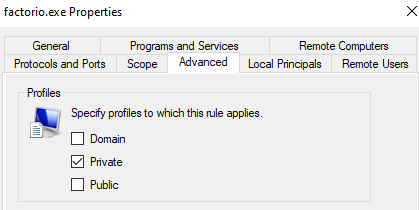
- 12-04-2025, 12-11-19.png (12.64 KiB) Viewed 1117 times
Re: Friend is unable to directly connect unless I disable Windows Defender Firewall
Posted: Thu Dec 04, 2025 9:18 pm
by jackthesmack
This was likely caused by me selecting the wrong options somehow when choosing to allow. I do not know how only Public got selected. Maybe something I selected in an older interface of Windows 11? Private has always been my home network connection
Either case, I deleted the entries, then started an MP game and got this popup. I selected Allow to make new entries that were correct. This ended up being a Windows configuration issue.
