Page 1 of 1
Show circuit condition in "entity tooltip"
Posted: Sun Jan 05, 2025 2:22 pm
by erkki772
Showing circuit condition in entity tooltip. Reducing opening entities while doing circuit conditions of checking conditions.
Re: Show circuit condition in "entity tooltip"
Posted: Sun Jan 05, 2025 6:08 pm
by Muche
Circuit connection panel already shows relevant signal values.
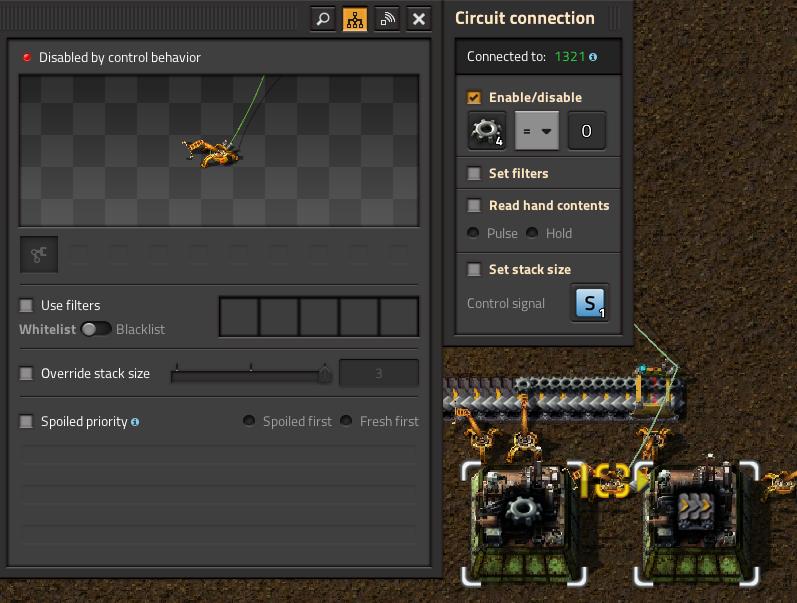
- Inserter-CircuitNetwork_SignalValue.jpg (68.83 KiB) Viewed 1054 times
Or do you mean you want electric poles' functionality of showing all signal values for all entities?
Re: Show circuit condition in "entity tooltip"
Posted: Sun Jan 05, 2025 8:41 pm
by erkki772
Muche wrote: Sun Jan 05, 2025 6:08 pm
Circuit connection panel already shows relevant signal values.
Inserter-CircuitNetwork_SignalValue.jpg
Or do you mean you want electric poles' functionality of showing all signal values for all entities?
The whole panel of that item without opening it. Showing whole condition(s) it have. Just like in the picture. I moved it there after opening that. Just think you have 10+ DC's and to see their condition, you have to open everyone. Every single one. Showing that circuit condition under tooltip would help a lot.
Re: Show circuit condition in "entity tooltip"
Posted: Sun Jan 05, 2025 10:32 pm
by Muche
I see.
In that case, an ability to leave some windows open (like
Multiple windows opened at same time,
Keep combinator windows open) might be more suitable.
As the space under the minimap is quite limited even now (see e.g.
119141 Thruster side panel doesn't fit screen on default UI scale) and assemblers & co. have quite high tooltips and circuit/logistic connection windows, so may run into the same cut-off issues.
Re: Show circuit condition in "entity tooltip"
Posted: Mon Jan 06, 2025 1:45 pm
by erkki772
If space is issue, then there's space next to tech research panel. That would be optimal spot