Page 1 of 1
Button to Copy Train to Blueprint
Posted: Sat Sep 03, 2022 3:50 am
by Unique_Pineapple
TL;DR
Add a button to the train UI to copy the train to a new blueprint.
Why ?
Creating copies of trains is annoying. Either manually recreate the train and copy the locomotive, or manually create a blueprint of the train.
A dedicated button in the train UI would speed this process
up significantly, especially if the blueprint was immediately inserted into the player's hand.
A bonus would be to also "straighten" any bent trains so they can be easily placed on a track.
Here's a mock
up:
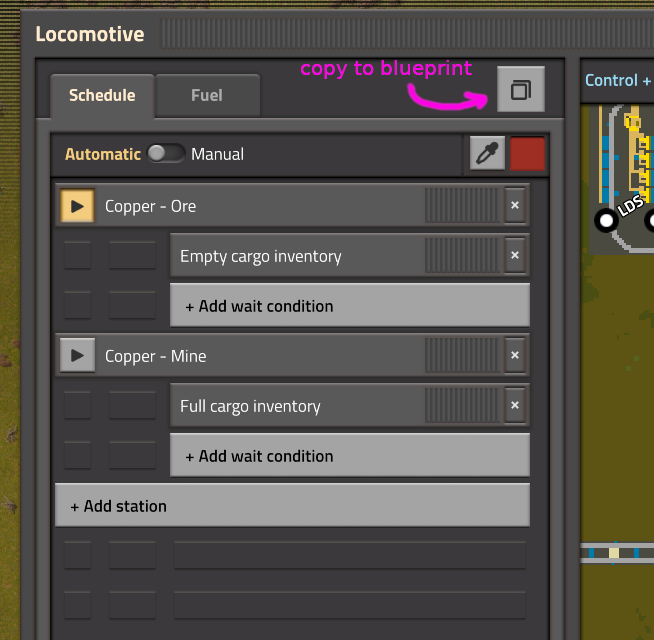
- copy-train.png (102.04 KiB) Viewed 2337 times
Re: Button to Copy Train to Blueprint
Posted: Sat Sep 03, 2022 11:16 am
by ssilk
Will this copy a train in the moment you make the blueprint of it?
If yes: if the rails are missing, how could you find a part of the track, that matches the exact rail-positions of that train?
If not: how would you place it then on track, if there are several switches and you want to have the train placed in a specific position? (If you place it and there is a switch, is it be placed in the straight or snapped path? Does that depend on, where you have copied it from?)
You see: this suggestion is not thought to the end and needs some refactoring.

Re: Button to Copy Train to Blueprint
Posted: Sat Sep 03, 2022 11:32 am
by mrvn
Finding the rails below a train seems to already be implemented. When you blueprint a train but don't include all the needed rails the missing rails get included in the blueprint already. It would just start with fewer rails to start with.
But he mentions straightening the train. So my algorithm would be: Take the train and ignore it's position. Add straight rails according to the length of the train and then recreate the train on those rails. Place the train so it drives to the right.
It would be nice to have a blueprint with just the train (no rails) and then have the train snap to the track when you place it but that would be a big change to how blueprints work. I think straightening the train out is the best compromise. If you want a blueprint of a train with curves then make a blueprint the old fashioned way.
Add a button to trains to blueprint them.
Posted: Wed Nov 12, 2025 1:58 am
by Zamblom
TL;DR
Add a button to the train interface to spawn a blueprint of the train for Quality of Life.
What?
A simple button to spawn a blueprint of the train quickly and without fuss into the player's hand.
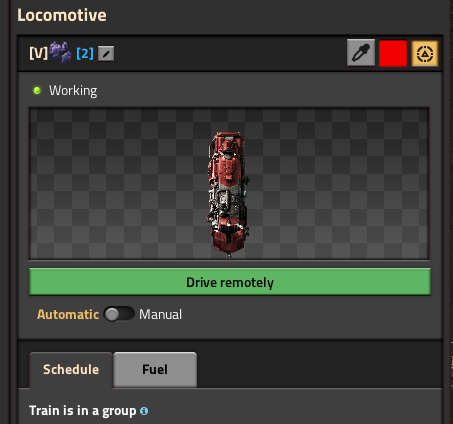
- 11-12-2025, 01-52-56.png (48.68 KiB) Viewed 1000 times
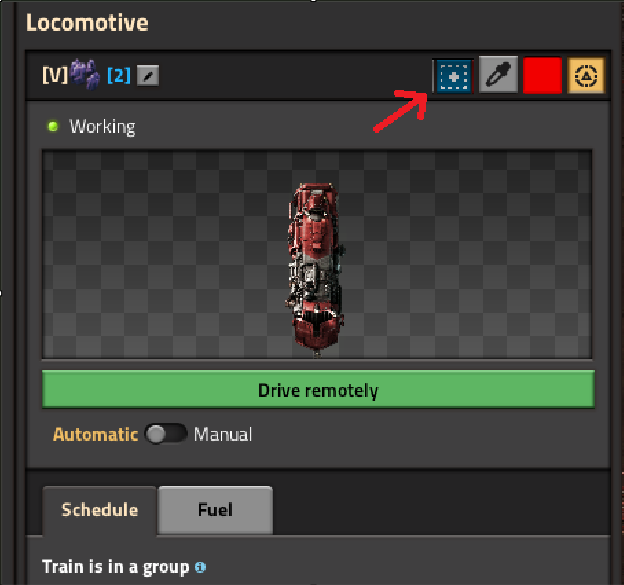
- 11-12-2025, 01-54-33.png (65.84 KiB) Viewed 1000 times
Why?
Currently, unless I am missing something obvious, I have to either stop or
catch up to a train, then select the blueprint tool, then select it, then tick the box to show the train in the blueprint and untick the rails, and then I can finally use the blueprint to place the train.
I feel that it would be a nicer user experience to be able to grab a blueprint of the vehicle, as if on a straight rail, without any of the aforementioned hassle.
The train menu seems the logical place to put such a button.
Re: Button to Copy Train to Blueprint
Posted: Sat Nov 15, 2025 9:51 am
by Koub
[Koub] Merged into an older thread with the same suggestion.